
 File Explorer Root Browser APK Free Download
Version: 3.5.10.0
Application Description:
File Explorer Root Browser is a fully featured file manager & root browser for rooted superusers to take control of their Android device and root files & folders.- Access all Root Directories: Explore & access all of your Android's root directories & subdirectories with this advanced root browser
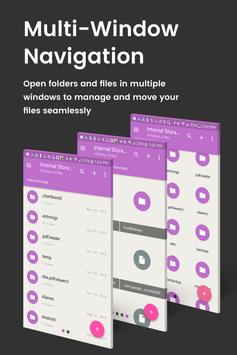
- Advanced Root Browser Features: Advanced features include a SQLite Database Editor, AP Analyzer, multi-pane navigation, ability to execute script files, ability to install zip files using clockwork recovery, and change file permissions and ownerships
- Advanced File Manager & File Explorer Features: This fully featured file explorer will transfer content, copy and paste, compress, extract ZIP, RAR, BIN, TAR, JAR & AP files, unzip, delete, and move files between local drive, external storage and cloud storage
- Cloud Storage: Now access your stored files and transfer files on Box, Dropbox, Google Drive, One Drive
- External File Manager: Access and transfer files, storage backup, USB Flash Drive manager, on the go support
- Fully Customizable: JRummy prides itself on offering users with a fully customizable experience including custom colors, themes, icons and file / view layout
- Audio Manager & Music Player: File manager for mp3 files, ringtone manager
- Video Player Manage and watch your favorite video files
- App Manager: Delete apps, manage app storage
- Organize your Android: File Explorer Root Browser allows users to have full control over all device files. Search and access any file in your system directory, sort by name size & date, create, move, copy/paste, transfer (external transfer) and delete any file
- Share your Files: Cloud storage integration to transfer files between external storage and on-the-go devices. Send files by email to easily share with your contacts.
File Explorer Root Explorer Features List:
- Multi-Pane Navigation
- SQLite Database Editor
- Custom File Listing View
- AP Analyzer
- Batch copy/paste, zip, tar, delete, move any file or folder
- External file transfer
- Access AP, RAR, JAR, TAR & ZIP files apk, rar, jar, tar & zip files
- Audio Player
- Video Player
- Cloud Storage Integration
- Change file permissions and ownership
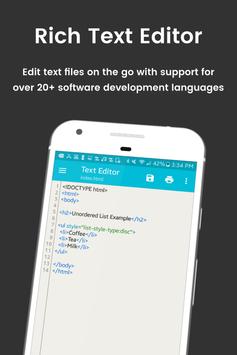
- View and edit any file
- sqlite explorer
- Text editor
- Move, copy, rename, and delete files.
- Create and delete directories (folders).
- Send files by email.
- Add new files & folders in any directory
- Install zip files using clockwork recovery
- Execute script files
- Show list of files with thumbnails for images.
- Bookmark any folder
- Open files and folders with other apps
- Change the theme (double tap home button)
- Sort by name, size & date
- Extract single files from zip/apks/jars
- Search for files or folders
Conclusion
To conclude File Explorer Root Browser works on Android operating system and can be easily downloaded using the below download link according to Freeware license. File Explorer Root Browser download file is only 9.1 MB in size.File Explorer Root Browser was filed under the Productivity category and was reviewed in softlookup.com and receive 5/5 Score.
File Explorer Root Browser has been tested by our team against viruses, spyware, adware, trojan, backdoors and was found to be 100% clean. We will recheck File Explorer Root Browser when updated to assure that it remains clean.
File Explorer Root Browser user Review
Please review File Explorer Root Browser application and submit your comments below. We will collect all comments in an effort to determine whether the File Explorer Root Browser software is reliable, perform as expected and deliver the promised features and functionalities.Popularity 10/10 - Downloads - 58 - Score - 5/5
Softlookup.com 2026 - Privacy Policy
| Category: | Productivity |
| Publisher: | JRummy Apps |
| Last Updated: | 02/03/2022 |
| Requirements: | Android 4.3+ |
| License: | Freeware |
| Operating system: | Android |
| Hits: | 1372 |
| File size: | 9.1 MB |
| Name: * |
E-Mail: * |
| Comment: * |
|