 YTMate - Free YTMate Downloader & Converter APK Free Download
Version: 3.2.7.1120
YTMate - Free YTMate Downloader & Converter
YTMate app is free and Lightweight. YTMate downloader and MP3/MP4 converter for YouTube with playlists, background download, and resume support.Application Description:
YTMate - Lightweight YouTube Downloader & Converter
YTMate is a free, lightweight YouTube downloader and converter for Android. The YTMate app is just 7.9 MB, supports Android 2.3.2 and newer, and converts YouTube videos to MP3 audio or MP4 video without registration. Built-in playlist management, background downloading with resume support, and a fast multi-connection download mode make YTMate one of the most efficient downloaders for older or low-storage devices.
- Version: 3.2.7.1120
- File size: 7.9 MB (one of the smallest in its category)
- Requires: Android 2.3.2 (Gingerbread) or later
- License: Freeware
- Category: Utilities
- Publisher: Devian Studio
- Last updated: October 2023

What is YTMate?
YTMate (sometimes typed as yt mate or ytmate.com) is a focused YouTube downloader app - not an all-in-one media browser. The YTMate downloader connects to YouTube, lets you search videos, and saves them locally as either MP4 video or MP3 audio. The YTMate converter is powered by a companion MP3 Media Converter module that handles audio extraction. The app does not require an account, watermark, or sign-up to function.
YTMate Features
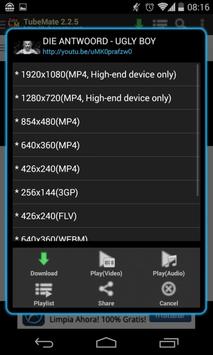
- YTMate downloader - saves YouTube videos in 144p, 240p, 360p, 720p HD, and 1080p Full HD MP4.
- YTMate converter - extracts MP3 or M4A/AAC audio at multiple bitrates without re-encoding loss when AAC is chosen.
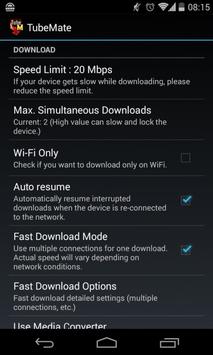
- Fast download mode - uses multiple parallel connections to maximise throughput on good networks.
- Background downloading with notification-bar progress; keep using your phone while files download.
- Resume support - interrupted downloads can be resumed from where they stopped (most YouTube sources).
- Built-in playlists - create, reorder, and play back-to-back queues of downloaded or streaming videos.
- YouTube search and related-video suggestions built into the app's home screen.
- 3D and 360-degree video downloads (a compatible viewer like Panorama 360 is required for playback).
- Caption file management - toggle CC subtitle download per video or globally.
- Custom download folders for video and audio, with optional SD card output on supported Android versions.
- Tiny footprint at 7.9 MB; works on Android 2.3.2 (Gingerbread) and up.
- Free, no signup, no watermarks, no daily caps.
How to Install YTMate
- Tap the Download YTMate 3.2.7 APK button on this page.
- Open the downloaded APK file.
- If Android blocks the install, go to Settings → Security (or Apps → Special access → Install unknown apps on Android 8+) and enable installs from your browser. Android may recommend Allow this installation only - that's safe to choose.
- Some devices ask which package installer to use - pick the system default.
- Tap Install, then Open.
How to Download Videos with YTMate
- Open YTMate. The home screen has a search bar and trending video suggestions.
- Search for a video by name or paste a YouTube URL into the search field.
- Tap the video to open it, then tap the download button at the top.
- Pick a resolution - file sizes are shown next to each option. Tap Play instead if you want to stream.
- Tap Download. Progress appears in the notification bar; pull it down to see status.
- When the download finishes, tap the file in your Downloads list to play it or open the menu for more options.
YTMate Converter - Convert YouTube to MP3 or M4A
The YTMate converter handles two paths to audio:
- Download as audio directly: open the Downloads tab, choose Audio as the format, and YTMate saves an MP3 or M4A file straight from the source.
- Convert an existing download: in your Downloads list, open the video's option menu and choose Extract Audio (MP3). The MP3 Media Converter module performs the conversion locally.
M4A/AAC tends to give better audio quality at the same file size as MP3 and converts faster, so it's worth choosing when your music app supports it (almost all modern Android players do).
Resuming Interrupted Downloads
When a YTMate download stops because of a dropped connection or app close, open the Downloads list, tap the menu icon on the stopped item, and choose Resume. The download continues from where it left off rather than starting over. Resume works for most YouTube sources but may not on every third-party site.
Using Playlists in YTMate
YTMate has a built-in playlist system. Add a downloaded video to a playlist via Add to playlist in the option menu, or add a streaming video by tapping Playlist after pressing the download button. The default Current List is a temporary queue that clears when you close the app - create a named playlist with the + button to keep something permanent. Playlists support drag-to-reorder and item removal.
YTMate on Windows and Mac
YTMate is Android-only, but you can run it on a Windows PC or Mac through an Android emulator. The setup is the same on both platforms:
- Install BlueStacks on your computer.
- Download the YTMate APK from the link on this page.
- Open BlueStacks, click My apps → Install APK, and select the downloaded YTMate file.
- Wait for the installation to finish (around 30–60 seconds on most machines).
- Launch YTMate from BlueStacks just like any other Android app.
The PC version benefits from a larger screen and unlimited storage, which is helpful for HD video collections.
Customising Download Folders
Open Preferences from the menu and choose Folder for Video or Folder for Music to change where files are saved. On Android 4.4 and later, Google restricts apps from writing freely to SD cards, so YTMate works best with internal storage. If you run out of internal space, use the Move to SD card option on individual files instead of changing the global folder.
System Requirements
| Operating system | Android 2.3.2 (Gingerbread) or later |
|---|---|
| File size | 7.9 MB |
| License | Freeware |
| Category | Utilities |
| Latest version | 3.2.7.1120 |
| Publisher | Devian Studio |
Frequently Asked Questions
Is YTMate free?
Yes. YTMate is freeware. No purchases, subscriptions, or download limits.
Is YTMate safe?
The APK on this page has been scanned for viruses, spyware, adware, trojans, and backdoors and was found clean. Always review Android's permission prompts before installing any APK from outside the Play Store.
I get "EACCES (Permission denied)" - what does that mean?
YTMate doesn't have write access to the folder you chose. Open Preferences and change the download folder to internal storage. On Android 4.4 and later, Google restricts general apps from writing freely to SD cards.
Why are my downloads slow?
Speed depends on your network. Fast Download Mode opens multiple parallel connections, but on a weak network it can actually slow things down - try turning it off in Preferences.
Why can't I download Full HD videos?
Some videos don't have an HD version on YouTube. Others use the DASH streaming format, which needs the MP3 Video Converter module to merge into a playable file. Make sure you have the latest YTMate version, since YouTube format changes occasionally require app updates.
Why does YTMate ask me to enter a CAPTCHA?
YouTube occasionally serves a verification page when it detects automated traffic. Enter the CAPTCHA correctly and YTMate resumes normally.
Can YTMate download 3D or 360° videos?
Yes - YTMate downloads them as standard files, but you'll need a 3D or 360-degree player like Panorama 360 to view them properly. They look distorted in regular video players.
How do I uninstall YTMate?
Go to Settings → Apps (or Application Manager on older Android versions), pick YTMate, and tap Uninstall.
A Note on YTMate
YTMate should only be used to download videos and audio you have permission to save - your own uploads, Creative Commons content, public-domain material, or content explicitly marked for offline viewing.
Conclusion
YTMate is one of the smallest YouTube downloaders. The YTMate app pairs a focused YouTube-only downloader with a competent MP3/M4A converter, playlist management, resume support, and compatibility back to Android 2.3.2 - making it a reliable choice on older or low-storage phones where heavier downloaders won't fit. For users searching for a YTMate APK, YTMate downloader, or YTMate converter, this is the latest stable build.
Conclusion
To conclude YTMate - Free YTMate Downloader & Converter works on Android operating system and can be easily downloaded using the below download link according to Freeware license. YTMate - Free YTMate Downloader & Converter download file is only 7.9 MB in size.YTMate - Free YTMate Downloader & Converter was filed under the Utilities category and was reviewed in softlookup.com and receive 5/5 Score.
YTMate - Free YTMate Downloader & Converter has been tested by our team against viruses, spyware, adware, trojan, backdoors and was found to be 100% clean. We will recheck YTMate - Free YTMate Downloader & Converter when updated to assure that it remains clean.
YTMate - Free YTMate Downloader & Converter user Review
Please review YTMate - Free YTMate Downloader & Converter application and submit your comments below. We will collect all comments in an effort to determine whether the YTMate - Free YTMate Downloader & Converter software is reliable, perform as expected and deliver the promised features and functionalities.Popularity 10/10 - Downloads - 63 - Score - 5/5
Softlookup.com 2026 - Privacy Policy
| Category: | Utilities |
| Publisher: | Devian Studio |
| Last Updated: | 07/10/2023 |
| Requirements: | Android 2.3.2+ |
| License: | Freeware |
| Operating system: | Android |
| Hits: | 9532 |
| File size: | 7.9 MB |
| Name: * |
E-Mail: * |
| Comment: * |
|