In depth
A closer look at Floating Sticky Notes
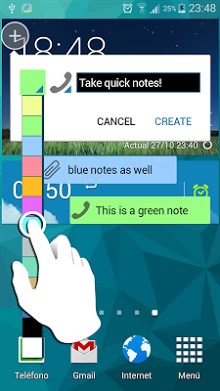
Floating notes allows you to create quick sticky notes that keep visible in screen while using other apps. You can dock them to the edge of the screen by pushing them. Usefull for quick note taking and keep all you need to remind accessible. Easy to use and simple. No hard configurations, no unnecessary options that bother you in your notes. You can have your notes visible or docked while you do other tasks. Features Create sticky notes that keeps visible over other apps and are drag-able through the screen User other apps while notes are visible or docked Edit notes by touching the text inside Dock notes dragging them to the screen edge. Auto-Dock button to dock all the notes at once Assign fancy icons to your notes Widget for fast note taking and activate/deactivate notes visibility Adjust notes transparency No annoying ads Translation corrections and suggestions are welcome! NOTE 1: Sometimes the notes will disappear for a couple of seconds. It is not a bug, it is because the app is launched in a mode that saves battery and avoids the need to have a fixed notification in the notification bar. Usually it the time is so short you won-t even notice or it happens while phone is locked. NOTE 2: For Andoid versions 2.X color and icons must be set inside the app, it is not possible to do it in the floating menu because of compatibility issues. Also transparency is not compatible with Android versions 2.X
Verdict
Should you install Floating Sticky Notes?
Floating Sticky Notes is an Android application available under the
Freeware
license — the APK is 1.6M.
We’ve catalogued it under
Business.
✓
Verified clean. Every Floating Sticky Notes APK on SoftLookup is scanned for malware, spyware, and adware. We re-test on every update.
Sponsored
At a glance
Floating Sticky Notes specifications
- Publisher
- Developer
- Last updated
- Feb 6, 2026
- License
- Freeware
- Operating system
- Android
- File size
- 1.6M
- Price
- Free
- Page views
- 1214
Sponsored
Help fellow users decide. Share your experience with Floating Sticky Notes.