
Android · Free download · Security
eProxy For Android2.7.29-NIGHTLY
- Operating system
- Android
- File size
- 4.80 MB
- License
- Freeware
- Last updated
- May 5, 2026
10 downloads·1575 page views
Android · Free download · Security
10 downloads·1575 page views
Screenshots
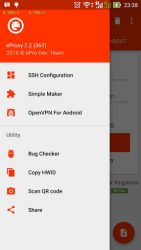
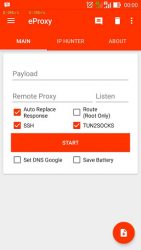
In depth
Modified outgoing request your ISP
Send data requests through a proxy How to use: Option 1 (Direct Connection)
Open eProxy, add custom request and start.
Open your device's settings > mobile network > APN
Edit your ISP APN and then use "127.0.0.1" as the proxy server and "1707" (default) as the port. Option 2 (SSH)
Open eProxy add custom request and start
Open SSH and Check Socks5 Port forwarding and Forward All (This mode need root permission) or you can set tun2socks if your device not root
Checklist enable HTTP Proxy and set to 127.0.0.1:(your listen port) Option 3 (VPN)
Open eProxy add custom request and start
To combine with vpn add "http-proxy 127.0.0.1 (your listen port) on your vpn's configuration
Ex:
http-proxy 127.0.0.1 1707 Disclaimer :
Feature "extra protection" will be clean app was running on the background (if your device rooted), if you won't this don't activate this feature when you saving config. ) Note:
If you get eProxy force close when install new version, try clear clear data please (Setting-apps)
If you get question contact our fanpage Fanpage :
facebook.com/eProxyserver
Verdict
eProxy For Android is an Android application available under the Freeware license — the APK is 4.80 MB. We’ve catalogued it under Security.
At a glance
Help fellow users decide. Share your experience with eProxy For Android.