In depth
A closer look at Image Shrink Lite Resizer
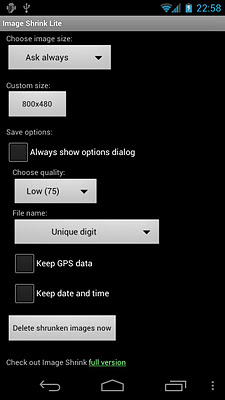
Resize photos and pictures easily before sending them by Email or sharing them on Twitter, Facebook or Instagram. It-s the most downloaded photo/picture resizer on Google Play. It works with Share via or Send to feature of Android OS. Please read help page in the app before using Image Shrink. I-m sure you will like how it works. Features: - Automatic rotation according to Exif tag - eep Exif tags of original photos - eep GPS data of original photos - Custom size - Recently used apps on the top of the list - One click deletion of resized photos created before Full version has: - Batch resizing of multiple photos - More size options - Automatic delete old shrunken images Resized photos/pictures are stored in a separate directory in SD card. Original pictures are kept intact. This app doesn-t have features that photo editors have, like cropping, rotating and various effects. However it-s a simple and handy tool that is less than 200B with minimal permissions. HOW TO RESIZE #1 1. Select photos/pictures in Gallery 2. Share to Image Shrink. HOW TO RESIZE #2 1. Choose ‘Attach File- in email app 2. Choose Image Shrink 3. Choose Gallery 4. Select photos/pictures
Verdict
Should you install Image Shrink Lite Resizer?
Image Shrink Lite Resizer is an Android application available under the
Freeware
license.
We’ve catalogued it under
Photography.
✓
Verified clean. Every Image Shrink Lite Resizer APK on SoftLookup is scanned for malware, spyware, and adware. We re-test on every update.
Sponsored
At a glance
Image Shrink Lite Resizer specifications
- Publisher
- Developer
- Last updated
- Feb 1, 2026
- License
- Freeware
- Operating system
- Android
- Price
- Free
- Page views
- 1078
Sponsored
Help fellow users decide. Share your experience with Image Shrink Lite Resizer.