In depth
A closer look at Health Sync
Sync your health data between Google Fit and Samsung Health, or between Samsung Health and Fitbit. Every 10 minutes or just a few times per day, you choose how often.
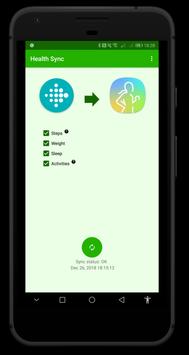
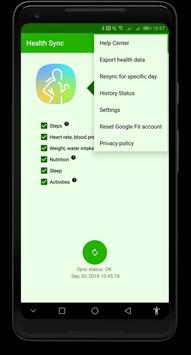
Health Sync offers you the possibility to sync Steps, Exercises/Activities, Sleep, Weight, Water intake, Nutrition (Food intake), Blood pressure, Blood Glucose, Blood oxygen saturation and Heart rate from Samsung Health to Google Fit, or from Google Fit to Samsung Health. From Fitbit to Samsung Health currently only Steps, Activities, Sleep and Weight are supported. From Samsung Health to Fitbit currently only Activities, Sleep and Weight are supported. It will sync data starting one day before the day you first use the app. History data (all data before the day of installation) can be synced after the free trail period, but currently this is only supported between Google Fit and Samsung Health. History data from or to Fitbit can't be synced yet, this will become available around March 2019.
One week free trial
Health Sync is very easy to use. It offers you a one week free trial period. After that you have to pay a small subscription amount or a one time purchase to continue using Health Sync.
Wearables
Health Sync works with all data stored in Google Fit, Samsung Health and Fitbit. Also when health data is tracked by your wearable (Fitbit Charge, Android Wear, Samsung Gear or the Galaxy Watch for example) it will be synced, as long as it is stored in Google Fit, Samsung Health or Fitbit. Health Sync does not connect directly with the wearable device, but with your Google Fit account, the Samsung Health app on your phone or your Fitibit account in the cloud.
Sync direction Google Fit and Samsung Health
Weight, water intake, nutrition, blood pressure, blood glucose, blood oxygen saturation and heart rates are synced in both directions: from Samsung Health to Google Fit and from Google Fit to Samsung Health. The other health data (steps, sleep, exercise/activity) is only synced in one direction: from Samsung Health to Google Fit or from Google Fit to Samsung Health. It is technically not possible to sync this health data in both directions.
Sync direction Fitbit
Fitbit data (sleep, activity, steps and weight) is synced to Samsung Health. You can also choose to sync Samsung Health data (sleep, activity and weight) to Fitbit. It is currently not possible to sync Fitbit data to Google Fit, or to sync data from Google Fit to Fitbit. The sync from Fitbit from and to Google Fit will be added in the future.
Support and service
When the sync doesn't work correctly you can check the Help Center menu in Health Sync. If your problem isn't listed, you can send a Health Sync Report to the developer. This is an option in the Help Center menu of Health Sync. You can also send an email to info@appyhapps.nl
Privacy
Health Sync doesn't store your health data. Privacy and protection of your health data is important. See the privacy policy for details.
Requirements
Device requirements
Android 4.4+
Verdict
Should you install Health Sync?
Health Sync is an Android application available under the
Freeware
license — the APK is 4.1 MB.
We’ve catalogued it under
Health.
✓
Verified clean. Every Health Sync APK on SoftLookup is scanned for malware, spyware, and adware. We re-test on every update.
Sponsored
At a glance
Health Sync specifications
- Publisher
- appyhapps.nl
- Last updated
- Jan 22, 2026
- Requirements
- Android 4.4+
- License
- Freeware
- Operating system
- Android
- File size
- 4.1 MB
- Price
- Free
- Page views
- 1070
Sponsored
Help fellow users decide. Share your experience with Health Sync.