In depth
A closer look at GPS Map Camera
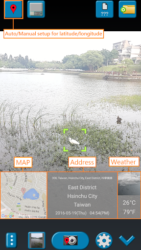
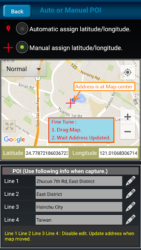
Please watch the teach video to know how to use it. When you take a picture, this application will paste the Google map, address, weather and date to picture. (GPS latitude/longitude information also could be included) This application is easy to get/set GPS location and GPS coordination for GPS Tag request. [Quick GPS Map Camera Guideline] When GPS Map Camera start, map/address/weather will be displayed on the camera preview. You can check the location/coordination before camera capture. If you want to fine tune the location, manually setup the latitude and longitude also supported. (left-top button) Support some drawing styles for map/address/weather/date. (left-top second button) Support a variety of file-name formats to help you arrange your photos. (right-top second button) You can change the picture save folder for help arrange photos. (right-top button) In the camera setting page, the similar functions will be grouped with the same color.
- Camera Choice- Flash- Scene/Exposure/White Balance/ISO/Color Effect- Focus Mode- Anti-banding- Picture Size/Picture Quality- GPS Use/GPS picture save/Mp Type/Map Resolution/Map Zoom Scale/Map Size- Photo Viewer- Sound- Prompt DialogThe color of function string is white as default. If change to another function, the color will change to grouped color. It-s better to recognize what you set. [Others]- Camera focus and zoom operation when preview:Focus: use one finger to touch the screen.Zoom: use two fingers to zoom in/out.
- External photo viewer to enhance the viewer ability:This application-s photo viewer which we call it -internal viewer-. It is easy to use.If you want more powerful GPS photo viewer, you need use external photo viewer.Please setup in the setting page. Select -Photo Viewer- item and then choice -external viewer-. It means that -when you click the bottom-left second button, application will launch the external viewer-.
- External photo editor:Currently, this application do not provide photo editor functions by itself.But it provides external photo editor. You can select one photo and then launch to external photo editor. After edit finished and go back to this application. It helps to copy/move edited photo to your picture save folder. Please check the following description. [Tips]- Don-t want to get MAP: Settings -> GPS picture save -> one (original)- Don-t want to save GPS position: Settings -> GPS Use -> disable GPS- Don-t want to popup prompt dialog: Settings -> Prompt Dialog -> disable [Third party resources which application use]- Google map. ( Maps.google.com/ )- Yahoo weather. ( weather.yahoo.com/ ) [ Recommended External Photo Editor ](
Verdict
Should you install GPS Map Camera?
GPS Map Camera is an Android application available under the
Freeware
license — the APK is 3.62 MB.
We’ve catalogued it under
Photography.
✓
Verified clean. Every GPS Map Camera APK on SoftLookup is scanned for malware, spyware, and adware. We re-test on every update.
Sponsored
At a glance
GPS Map Camera specifications
- Publisher
- JK.Fantasy
- Last updated
- Feb 11, 2026
- License
- Freeware
- Operating system
- Android
- File size
- 3.62 MB
- Price
- Free
- Page views
- 1110
Sponsored
Help fellow users decide. Share your experience with GPS Map Camera.