In depth
A closer look at Polarr Photo Editor
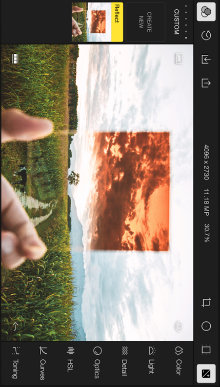
Polarr is the pro photo editor for everyone. From high-precision color tools to advanced clarity and dehaze filters, Polarr Photo Editor brings free pro photo editing tools to your mobile device! Polarrs basic and advanced tools for beginners and enthusiasts alike makes it stand out in a sea of editors like Snapseed, VSCO, Adobe Lightroom, Pixlr, Fotor, Aperture, Photoshop Express and BeFunky. Free online version (no download required) at polarr.co.
-Sophisticated and high-quality [photo] editing tools-Business Insider Features:- Color: Temperature, tint, contrast- Light: Exposure, highlights and shadows- Optics: Distortions, vignette, fringing- Detail: Clarity, sharpening, de-noise- Advanced HSL and RGB Curve tools- Toning tools for highlights/shadows- Multiple local adjustments- Circular and gradient filters- Create custom filters based on history- Export photo at different dimensions- Infinite undo and history tracking -Dehaze and Denoise, as well as new tools such as chromatic shift The world of photo editors is vast- from the traditional Adobe Lightroom and Photoshop, to desktop DSLR photo editors like Pixlr and Flickr, to mobile-first Snapseed, VSCO, Fotor, Aperture, and BeFunky. However, Polarr- with its wealth of basic and advanced toolsets for beginners and enthusiasts alike- is leagues above the rest. For issues or questions, please email support-polarr.co
Verdict
Should you install Polarr Photo Editor?
Polarr Photo Editor is an Android application available under the
Freeware
license.
We’ve catalogued it under
Photography.
✓
Verified clean. Every Polarr Photo Editor APK on SoftLookup is scanned for malware, spyware, and adware. We re-test on every update.
Sponsored
At a glance
Polarr Photo Editor specifications
- Publisher
- Developer
- Last updated
- May 4, 2026
- License
- Freeware
- Operating system
- Android
- Price
- Free
- Page views
- 932
Sponsored
Help fellow users decide. Share your experience with Polarr Photo Editor.