In depth
A closer look at Pixelot - Pixelate, Blur Photos
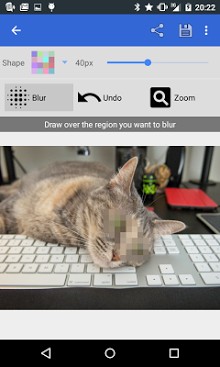
Pixelot provides an easy method for blurring or censoring regions of a photo with pixels. Use this app to hide faces, license plates, names - addresses, etc. Then share your picture on Google+, Facebook, Twitter, email, and more. Simply open Pixelot, choose an image from the gallery or take a new picture, and then drag your finger around the region you wish to censor. Alternatively, you can pick a specific color to use in the blur or select a common color from the image using the sample feature. Use this to mask faces, account numbers, signatures, or just use it to do some fun unnecessary censorship. - Pixelot has no advertising or third-party links. There is a one-time in-app purchase that unlocks a set of premium features for a fee. Premium features include: - Triangle, Strip, Hexagonal, and Gaussian filters - No automatic resizing of images - Blur eraser: Selectively erase blurring, allowing you to undo blurring within regions of the image - Faces: Experimental support for automatic blurring of faces - Zoom and pan - - You must have Google+, Facebook, Twitter, etc apps installed in order to use this Share feature.
Verdict
Should you install Pixelot - Pixelate, Blur Photos?
Pixelot - Pixelate, Blur Photos is an Android application available under the
Freeware
license.
We’ve catalogued it under
Photography.
✓
Verified clean. Every Pixelot - Pixelate, Blur Photos APK on SoftLookup is scanned for malware, spyware, and adware. We re-test on every update.
Sponsored
At a glance
Pixelot - Pixelate, Blur Photos specifications
- Publisher
- Developer
- Last updated
- Jan 21, 2026
- License
- Freeware
- Operating system
- Android
- Price
- Free
- Page views
- 1085
Sponsored
Help fellow users decide. Share your experience with Pixelot - Pixelate, Blur Photos.