In depth
A closer look at Parental control app - unGlue
unGlue parental control app is the simplest way to manage your childrens screen time. With our unique parental controls you can set screen timer to limit screen time, use our app blocker to hide apps, and turn the internet off completely. You can manage as many iPhones, iPads, iPods, Android phones, Android tablets, Windows PCs and other devices. It takes a moment to set up our parental control app free for a trial period. With our screentime you can set limits so your family time becomes quality time. unGlue is the parent control app for your family.
With unGlue you can now:
- Set daily screen time limits on disruptive apps like social media, videos, games
- Create screentime schedules for wakeup time, homework time, family time, and bedtime
- Use our app blocker to hide your kids apps when their screentime schedule is over
- Remotely block the internet on any device or on all devices with a single click
- Get your kids to do chores to earn more screentime. Finally they help around the house
- Block Adult content and pornography websites
- Assign multiple devices per kid & designate shared family devices
- Monitor app, game & website activity with usage reports for each device
unGlue is the only solution that lets parents set screen time boundaries across any type of device, iOS, Android, PCs, laptops, even Smart TVs. We let kids manage the own screentime across any device they have, at home and while on the go.
unGlue for Parents lets you:
- Block Instagram, block Snapchat, Block Housparty, block Live.ly, block Tinder, and other social networks
- Block YouTube, block Netflix, block Amazon prime, and other video apps
- Block Minecraft, block Fortnite, block Clash of Clans, block Pokmon Go and other games
- Block internet access, block apps outside of screentime settings
- Teach your kids important time management skills
- Set internet schedules for dinnertime, homework time, bedtime for better family time
- Reward kids for doing chores with extra screentime
Better screen time habits
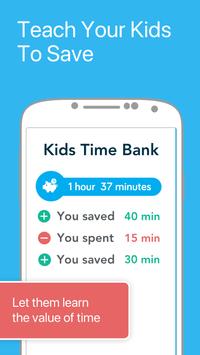
With our Time Bank feature, kids can spend and earn their screentime minutes like cash. Parents set the screentime withdrawal limit per day so there is no more binge-watching
Chores for Time
Reward your children with more screentime when they complete chores from their ids App. (Take out the trash=15 more minutes!) Create new custom chores or customize existing ones to fit the chores that match your family
Turn the Internet off
Turn off internet access for one or all devices with a simple click. Whether it's time for homework time, or family time, we make it easy to create a screen-free zone
Monitor Activities
eep an eye on the sites & apps your kids visit through the unGlue usage report. This tool helps parents have informed conversations with children about the content theyre spending their screentime with. id safety is important! Stop the netsanity with unGlue
Block content
Make the Internet age-appropriate & safe for your kids with a single click. Easily block adult content & other red-flag sites
SUBSCRIPTION & TERMS
unGlue offers a 14 day free trial when you sign up.
Requirements
Device requirements
Android 4.2+
Verdict
Should you install Parental control app - unGlue?
Parental control app - unGlue is an Android application available under the
Freeware
license — the APK is 16.1 MB.
We’ve catalogued it under
Parenting.
✓
Verified clean. Every Parental control app - unGlue APK on SoftLookup is scanned for malware, spyware, and adware. We re-test on every update.
Sponsored
At a glance
Parental control app - unGlue specifications
- Publisher
- unGlue
- Last updated
- May 5, 2026
- Requirements
- Android 4.2+
- License
- Freeware
- Operating system
- Android
- File size
- 16.1 MB
- Price
- Free
- Page views
- 1308
Sponsored
Help fellow users decide. Share your experience with Parental control app - unGlue.