A closer look at Always On Edge - Edge Lighting ًں”¥
eep the Edges lighting always with down to 0% CPU usage, this is an accessory not just an app it is an app you made.
border light works without receiving a notification. in addition to lighting when a notification comes.
THIS IS A RIMIX between always on display and edge lighting but with a lot more options to controll.
here is its main features
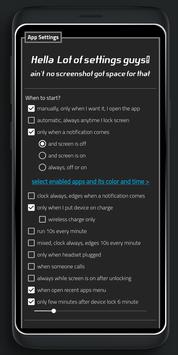
… When it start? -manually, only when I want I open the app. -automatic, always anytime I lock screen. -only when a notification comes: .and screen is off. .and screen is on. .always, off or on. -clock always, edges when a notification comes. -only when I put device on charge. .wireless charge only?. -run 10s every minute. -mixed, clock always, edges 10s every minute. -only when headset plugged listen music. .and screen is off. .and screen is on. .always, off or on. -always while screen is on -when someone calls -when open recent apps menu
… emoji fall animation: -one shot. -always.
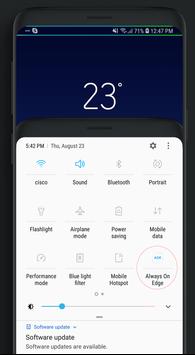
• if screen is on, can light notifications bar only • You can add toggle in system notification panel to switch between manual run (disable) / or any other you select (enable). • for notifications you can select each app and its color and lighting time sperated from others apps. • Whatever run option you choose, you can, at anytime, press volume down key to terminate the app and never run again until the next device lock . •you can remove AOE icon from notification bar . • option to not run if battery level less than.. • option to not run if charging. • option for home button. • option to not run app in between a periode like sleep time.. • pocket mode, close when in pocket or screen faced down, resume when out (more power). • SmartUnlock, when device on flat surface and I pick it up, close and open screen (more power). • Clock and widgets rotate on landscape screen, unlike other always on display apps.
… How it close? -Swipe up to close. -Double tap to close. -Pocket mode. -SmartUnlock.
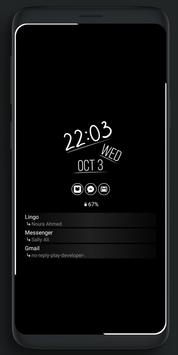
… More widgets not just edge lighting, with options to: -invisible music controller by swipe. -buttons music controller: always or only when headset connected. -Display clock: clock style. clock's Primary Color. clock's Secondary Color. clock size. clock date/seconds/language. clock face circular background. -Display notifications icons: number badge. clickable notifications icons. icon size. in a bar background. colored icons. bordered icons. -Show battery level. -Dim app screen, adjust brightness (save more power). -screen Image background: Image from gallery. Galaxy Light. Galaxy Full. -enable notch support, not for all devices ( but automatic and for any device running android Pie): notch height. notch width.
• as you see you make EDGE MAS and NOTCH MAS!. … Edge lighting animation style: -crash -stable (save more power, use 0% CPU) awesome with colors wave ! -follow -flicker -worm
… adjust Edge lighting: Edges speed. Edges thickness. Edges color number: One color. Two. Three. ¯ colors waves. ® (try with stable style!)
… adjust Space between Edges -medium -without space -narrow -wide
• edge lighting can be enabled/disabled. • widgets changes its position every 10m. of cource widgets will use additional power (optimized also), but the main usage of the app is edge lighting
Requirements
Device requirements
Android 5.0+
Verdict
Should you install Always On Edge - Edge Lighting ًں”¥?
Always On Edge - Edge Lighting ًں”¥ is an Android application available under the
Freeware
license — the APK is 5.2 MB.
We’ve catalogued it under
Collection.
✓
Verified clean. Every Always On Edge - Edge Lighting ًں”¥ APK on SoftLookup is scanned for malware, spyware, and adware. We re-test on every update.
Sponsored
At a glance
Always On Edge - Edge Lighting ًں”¥ specifications