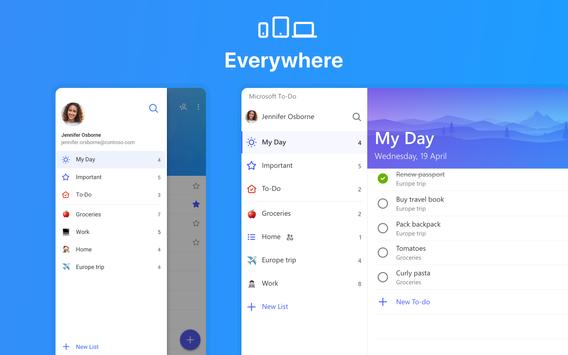
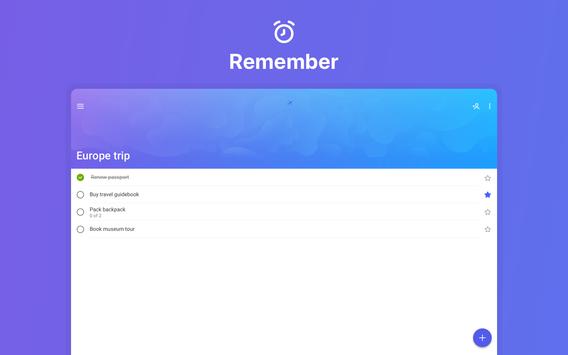
See Microsoft To-Do: List, Task and Reminder in action
In depth
A closer look at Microsoft To-Do: List, Task and Reminder
Microsoft To-Do is a simple and intelligent to-do list that makes it easy to plan your day. Whether its for work, school or home, To-Do will help you to increase your productivity and decrease your stress levels. It combines intelligent technology and beautiful design to empower you to create a simple daily workflow.
Organise and plan your day
Organise your day with To-Dos smart Suggestions and complete the most important tasks, jobs or housework you need to get done, every day. To-Do syncs between your phone and computer, so you can access your to-do from school, the office or the supermarket, or even whilst youre traveling around the world.
Share your lists with family and colleagues
List sharing enables you to collaborate on common lists and tasks and achieve your goals seamlessly. Whether you want to share a list of work items with your teams or a shopping list with your partner, with our share link, we make it easy to coordinate and collaborate in small teams and one-on-one. Getting things done together has never been easier!
Break down your task into smaller, actionable items
Steps (Subtasks) allow any to-do to be broken down into smaller, more actionable pieces. To help customers be even more productive, each to-do will display just how many steps (subtasks) it contains and how many of those steps have been completed so far. Steps (Subtasks) will also maintain their completion state even as the to-do they belong to is marked as completed or incomplete.
Set due dates and reminders
You can quickly add, organise and schedule your to-dos whilst youre on the go. With important to-dos that you really shouldnt forget, you can add reminders and due dates well remember them for you. And if you have to-dos that you need to tick off on a daily, weekly or yearly basis, you can set up recurring due dates to remind you each and every time.
Add notes to your tasks
You can also use To-Do as a note-taking app, adding detailed notes to every to-do from addresses, to details about that book you want to read, to the website for your favourite caf. You can collect all of your tasks and notes in one place to help you achieve more.
Colour-coding your lists
What areas of your life do you want to be more productive in? You can have a colour-coded list for each. Now you can quickly add your homework to one list, your shopping to another, your packing list, your work projects and your home DIY projects to yet more lists. And if you follow a productivity system, such as GTD (David Allens Getting Things Done Methodology), then you can create a Someday list or a Follow-up list.
Outlook integration
With the integration with Outlook Mail, you can view your tasks on your Outlook Desktop client or on Outlook.com using the same Microsoft Account. All to-dos are stored on Exchange Online servers, so they will be shown in both Microsoft To-Do and Outlook Tasks automatically.
Plan what you want to focus on each morning and give yourself a powerful productivity boost for the day. This simple to-do list app is free to download and use. It includes customisable themes, notes, reminders, due dates, smart Suggestions and syncing across multiple devices. In short, everything you need to manage your life and accomplish more. Completing your jobs or housework has never been so easy. It is the task management tool you need to add to your daily arsenal.
Requirements
Device requirements
Android 5.0+
Verdict
Should you install Microsoft To-Do: List, Task and Reminder?
Microsoft To-Do: List, Task and Reminder is an Android application available under the
Freeware
license — the APK is 9.6 MB.
We’ve catalogued it under
Productivity.
✓
Verified clean. Every Microsoft To-Do: List, Task and Reminder APK on SoftLookup is scanned for malware, spyware, and adware. We re-test on every update.
Sponsored
At a glance
Microsoft To-Do: List, Task and Reminder specifications