In depth
A closer look at Sound Meter App
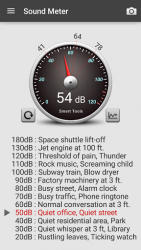
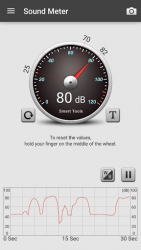
Sound Meter is in the 4th set of the Smart Tools collection.Have you ever suffered from the noise of the neighbors?SPL(sound pressure level) meter app uses your embedded microphone to measure noise volume in decibels(db), and shows a reference. I had calibrated a lot of android devices with an actual sound level meter (dBA).REMEMBER!! Most smartphone microphones were aligned to human voice (300-3400Hz, 40-60dB). Voice calls do not require high-performance microphones.Therefore the maximum value is LIMITED by manufacturers, and very loud sound(100+ dB) cannot be recognized. Moto G4 (max.94), Galaxy S6 (85dB), Nexus 5 (82dB), HTC Desire(82dB)-See 6-7th images. I calibrated major android devices with an actual meter. You can trust the result in routine-noise levels (40-70dB). Please use it as an auxiliary tool.
- Main features:- Upside down mode- Level notification- Material design- Pro version added features:- No ads- Vibrometer- Statistic menu (line chart)- CSV file exporting- Line-chart duration- Do you want more tools?download [Sound Meter Pro] and [Smart Tools] package
Verdict
Should you install Sound Meter App?
Sound Meter App is an Android application available under the
Freeware
license — the APK is 2.60 MB.
We’ve catalogued it under
Productivity.
✓
Verified clean. Every Sound Meter App APK on SoftLookup is scanned for malware, spyware, and adware. We re-test on every update.
Sponsored
At a glance
Sound Meter App specifications
- Publisher
- Smart Tools co.
- Last updated
- May 5, 2026
- License
- Freeware
- Operating system
- Android
- File size
- 2.60 MB
- Price
- Free
- Page views
- 1183
Sponsored
Help fellow users decide. Share your experience with Sound Meter App.