In depth
A closer look at FlipClock BlackOut Widget 4أ—2
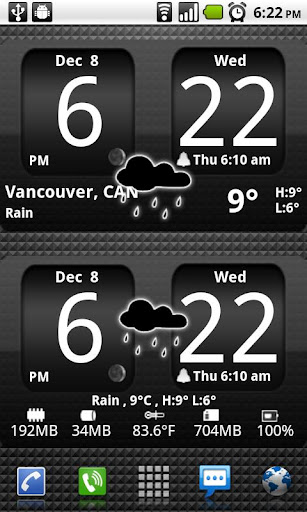
Android Digital clock widget with Calendar, Time, System info,weather & forecast
Android Digital clock widget Calendar, Time, System info,weather & forecast
A Digital Clock widget with size 4
2
It features:
135 skins
12/24 hr+Color on all info displayed
System Stats Info + pop-up
Weather & Forecast
2 Weather layouts on clock(user choice)
2 Forecast layouts(user choice)
-tap bottom right--preferences
-tap bottom left--system information dialog
-tap weather icon--forecast
-tap Hour--launch anything!(more coming)
-tap Minutes--launch anything!
Widgets on Android work a bit differently than a normal application. Unlike regular programs they don-t just install themselves in the application tray so you have to add them manually. They will not open or launch.
Here how to add a widget on your Android home screen.
Verdict
Should you install FlipClock BlackOut Widget 4أ—2?
FlipClock BlackOut Widget 4أ—2 is an Android application available under the
Freeware
license.
We’ve catalogued it under
Productivity.
✓
Verified clean. Every FlipClock BlackOut Widget 4أ—2 APK on SoftLookup is scanned for malware, spyware, and adware. We re-test on every update.
Sponsored
At a glance
FlipClock BlackOut Widget 4أ—2 specifications
- Publisher
- Developer
- Last updated
- May 5, 2026
- License
- Freeware
- Operating system
- Android
- Price
- Free
- Page views
- 996
Sponsored
Help fellow users decide. Share your experience with FlipClock BlackOut Widget 4أ—2.