Android · Free download · Productivity
App Backup and Restore1.0.9
- Operating system
- Android
- File size
- 4.31 MB
- License
- Freeware
- Last updated
- May 5, 2026
92 downloads·949 page views
Android · Free download · Productivity
92 downloads·949 page views
Screenshots
In depth
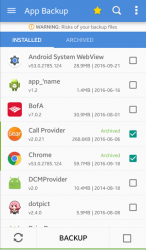
What you can do with App Backup - Restore? Bulk Backup - Restore apps that not used frequently to save more space
Auto Backup - Restore multi-versions to avoid unnecessary updates
Batch Backup - Restore your apps to enhance data security by making copies Highlights of App Backup - Restore —ˆ Apk Extractor Extract - Retrieve apk files and export as duplicates
—ˆ Apk Editor Downgrade app versions if you dislike updated ones
—ˆ Apk Installer Restore - Recover apps after factor reset or in a new phone
—ˆ Apk Manager Create your own local Playstore while lots of apps saved
—ˆ Apk Share Migrate - Send apps to different carriers and extend storage Features-Backup - Restore to phone memory by default
Backup - Restore to SD card or cloud drive
Send - Share backups through Email or other channels
Upload apps to cloud Google Drive, Dropbox, etc.
eep multiple versions with auto backup
Overwrite - Downgrade - Restore old versions
Schedule auto backup
Auto backup with notifications
Show - Backup - Restore system apps
Clear cache - Refresh app list
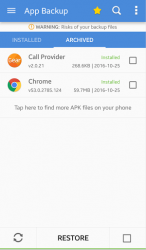
Manager apps by installed/archived
Show internal - external storage usage
Scan apk files on your device
Scan virus/malware for mobile security
Bulk - Batch backup, restore, send, upload
Sort installed - archived by name, date, size
Show backups size - time
Touch - Hold apps to check details
Share market links
Search apps in Playstore
Supreme app restore - Phone recovery, Samsung/Xiaomi/Lenovo/Motorola backup supported
All types of app - apk supported including Game, Tool, Social Media etc. Notice: 1- App Backup - Restore CANNOT backup/restore data or settings of apps, it only backup/restore apk files.
2- App Backup - Restore can only restore files that have been backed up BEFORE.
3- If you want to auto-backup apps, please open our app before updating apps.
4- Please backup apps to sd card or cloud before factor reset, or backups will be removed due to system restriction.
5- For some devices, our app cannot support SAF permission so it cannot switch to SD card. Please try with Backup Restore Apk Extractor. Requested
It is an updated version of this app that lets you make backup copies of all installed apps. It offers the same features as the original backup and restore app. Ppthe app lets you store archive or delete backups by simply selecting them from the main interface without leaving a single trace. Once archivated you can even send the apk file by email allowing you to easily store it on any disk drive. Of course you can also restore any application. The app interface is really intuitive so no matter how much experience you have with android it probably won't take you more than a minute to fully understand how all its features work. It is a very useful tool that makes managing your apps and apk files much easier.
Verdict
App Backup and Restore is an Android application available under the Freeware license — the APK is 4.31 MB. We’ve catalogued it under Productivity.
At a glance
Help fellow users decide. Share your experience with App Backup and Restore.