In depth
A closer look at GO Calendar Widget
It brings the real calendar to your home screen.
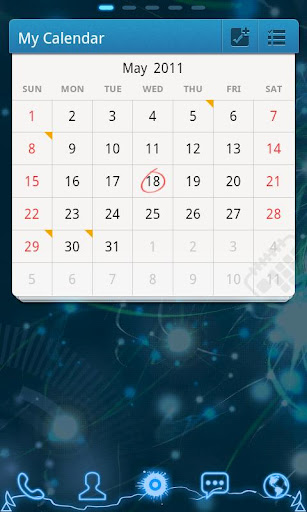
GO Calendar widget brings the calendar and the agenda to your home screen. It was designed to make it more simple and faster to work with your calendar. Two different views (month and agenda) give you a good overview to your upcoming events.
It also supports showing Chinese Lunar and Moon phase.
Compare to the traditional calendar widget, it supports switching between months by flipping like a real calendar.
Moreover, like other GOWidgets, theme is also supported.
To make it work, you must install the latest version of GO Launcher EX which is the most popular home launcher app in Android Market.
Available Size:
-4×3
-2×2
Actions:
View month
View agenda
Flip
Add agenda
View Chinese Lunar
View Moon phase
How to add GOWidget to your home screen?
-Long press on your home screen in GO Launcher EX. Press the GOwidget option and choose the widget you like. Make sure you have enough room for the widget.
Verdict
Should you install GO Calendar Widget?
GO Calendar Widget is an Android application available under the
Freeware
license.
We’ve catalogued it under
Productivity.
✓
Verified clean. Every GO Calendar Widget APK on SoftLookup is scanned for malware, spyware, and adware. We re-test on every update.
Sponsored
At a glance
GO Calendar Widget specifications
- Publisher
- Developer
- Last updated
- Feb 1, 2026
- License
- Freeware
- Operating system
- Android
- Price
- Free
- Page views
- 691
Sponsored
Help fellow users decide. Share your experience with GO Calendar Widget.