
Android · Free download · Productivity
WiFi Manager3.6.0.5
- Operating system
- Android
- File size
- 1.82 MB
- License
- Freeware
- Last updated
- May 5, 2026
61 downloads·921 page views
Android · Free download · Productivity
61 downloads·921 page views
Screenshots
In depth
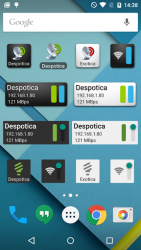
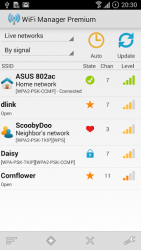
Includes home screen widgets: one displays detailed connection info, another lets you switch among your favorite networks with a single tap, and yet another toggles WiFi Access Point. Can scan for and switch to the best network out of several configured. New and improved: Improvements in "best network switcher" for 5Ghz specifically. Updated for Android 6. "Material design" widgets (version 3.5). A UI redesign (version 3.0): modern looking icons, swiping between list and radar views. Assign your own descriptions and icons to individual WiFi networks never forget what that "XYZ1234" network is; Switch among your favorite networks with a single tap by using the WiFi Network Switcher widget. It will even enable WiFi if needed. "Best network" to switch between different networks you may have around the house or office (off by default, enable in app settings); Automatic switching between fixed and dynamic (DHCP) IP addresses (Android Settings in 2.
- can't do this); Some features require that you purchase the $1.75 premium package, available right in the application through Google Checkout (safe, secure). These features are: advanced per-network options (description, icon, IP address), the one-tap network widget, and two widget themes inspired by Android 5.
- (Material Design, since version 3.5). All the other essential features are free: the widget with detailed connection info (four sizes, two free themes), scanning and connecting to networks, the network list view, the network signal radar. Orders are processed and saved by Google and can be reactivated after a phone reset / flash, or on a new phone. About requested permissions: "Change system settings" is needed to switch between fixed and dynamic IP addresses, if configured so. "Prevent phone from sleeping" is needed so you can enable automatic scanning and discover open networks around you. "Read USB storage" for notifications about open networks, when enabled, and the sound file is picked from the memory card. "Market billing service" is needed to make purchases.
If you have an issue or a question, please contact me at kmansoft-gmail.com (email is also shown in the about box and below).
Wifi manager is a tool to manage wifi connections thanks to which you not only will have the ability to find and connect to networks in your environment but also improve the quality of these connections. This application has many interesting details. In addition you can change the name and icon of the wifi networks around you to display on your screen as you wish. In addition, you can quickly see the status of the network and the channel number.
the best thing about wifi manager, however, is the comfort of the design of the widget, thanks to which you can carry out lots of actions directly from the main screen. To switch from one network to another you can simply swipe your finger across the screen. Wifi manager is a wifi network management tool that has a good range of services that are comfortable and has a colorful interface with the ability to adapt these elements.
Verdict
WiFi Manager is an Android application available under the Freeware license — the APK is 1.82 MB. We’ve catalogued it under Productivity.
At a glance
Help fellow users decide. Share your experience with WiFi Manager.