
Android · Free download · Productivity
Ruler4.1.8
- Operating system
- Android
- File size
- 3.75 MB
- License
- Freeware
- Last updated
- Feb 14, 2026
57 downloads·1055 page views
Android · Free download · Productivity
57 downloads·1055 page views
Screenshots
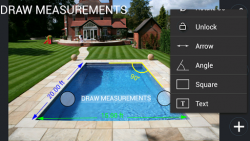
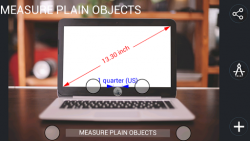
In depth
How to use Ruler: Photo Ruler: Firstly, please ensure that the object you wish to measure and the object of known length (Base Item) are in the same picture. Double tap on screen to call ruler settings. There is a predefined list of Base Items, including Debit/credit card and Quarter. Select the one you have. It is advised to use the Base Item which is closest in size to the object you wish to measure using Ruler. Secondly, ensure that the Base Item and the object you wish to measure using Ruler are in the same plane and the ruler camera is (or was) parallel to them. This is necessary to avoid image distortions caused by the ruler camera perspective. Align the Blue arrows against the Base item and Green arrows against the object you want to measure. The length of the measured object is shown in the top left corner of the Ruler screen. Ordinary ruler: Use screen as a traditional ruler. You can measure size of a small object by placing it on the device's screen and adjusting line limiters against the object. The size of the object will be show at the bottom of the screen automatically. If you see that rulers scale is visually stretched/ shrunken, you can reset ruler calibration manually. On-screen ruler can be calibrated using different Base Items, including Debit/credit card or coin. Double tap on screen to call settings. Choose between Imperial (inches) and Metric ruler (centimeters). Accuracy of Ruler:
Given that you have accurately aligned markers, you will receive a measurement that is as precise as when using a traditional metric ruler or tape measure.
Verdict
Ruler is an Android application available under the Freeware license — the APK is 3.75 MB. We’ve catalogued it under Productivity.
At a glance
Help fellow users decide. Share your experience with Ruler.