
Android · Free download · Business
Dynamic Notifications3.6
- Operating system
- Android
- File size
- 4.85 MB
- License
- Freeware
- Last updated
- May 3, 2026
68 downloads·1240 page views
Android · Free download · Business
68 downloads·1240 page views
Screenshots
In depth
FEATURES:
- Notifications don't light up when your phone is in your pocket, purse, or face down to avoid accidental unlocks
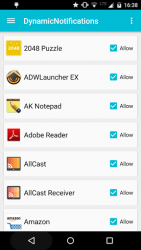
- Select which app-notifications you'd like to receive via DynamicNotifications
- Change the appearance of the app (custom foreground/background color/image, show the date near the clock, change the main notification border style, and more)
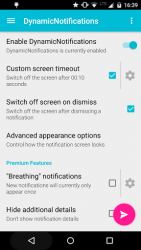
- "Custom timeout": Select for how long DynamicNotifications should be shown (Premium feature)
- "Breathing notifications": Let not yet dismissed notifications reappear after custom intervals (Premium feature)
- "Night mode": Don't show notifications at night (Premium feature)
- "Hide additional details": Hide additional notification details (e.g. SMS text, sender) (Premium feature)
- "Use as lockscreen": Use the app as a replacement for your stock lockscreen (Premium feature)
- "Auto-wake": Automatically turn on the screen when you pull the device out of your pocket or pick it up from lying face-down (!) on a table (Premium feature)
- "Custom brightness": Select how bright the DynamicNotifications screen should be (Premium feature)
- "Edit swipe actions": Choose the action (e.g. unlock, dismiss, launch camera/custom app) for each swipe direction (Premium feature) HOW-TO:
Swipe right to see more details about the notification
Swipe left to unlock the device (respects your unlock-security settings)
Swipe up or down to dismiss the notification FAQ:
How can I make sure the app is working correctly?
Launch the app and follow the setup steps. Then, switch off your phone's screen and send an email to yourself from your PC. After a few seconds, the notification screen should light up!
The screen sometimes turns on to the lockscreen, even if my phone is in my pocket
Please go to your phone's system settings > "Security" > "Device administrators" and tick the checkbox next to "DynamicNotifications". This will only- allow the app to lock your screen, nothing else!
When I lock my screen, nothing happens!
The app isn't a lockscreen replacement. It respects your security settings (PIN/Pattern lock) and only appears if you actually receive a new notification while the screen is turned off
Will the app become available for Android 2.x, 3.x, 4.x?
The app is now compatible with Android >=4.0. If you're running Android 4.3, it will make use of the new "NotificationListenerService"-feature introduced in Android 4.3.
Why can't I uninstall the app?
Please go to your system settings, select "Security",-Device Administratorsand uncheck the DynamicNotifications-entry. You will then be able to uninstall the app.
My phone starts talking to me when I enable the app?!
This is a known Samsung-bug; Please go your system settings, select "Apps" > "All" > Samsung TTS engine > Disable. If this isn't working, go to your system settings, "Accessibility", "Talkback" (make sure it's disabled), "Settings", and uncheck- all options you see here. Please let me know if there's something that doesn't work for you before leaving a review! App formerly known as "ActiveNotifications"
Verdict
Dynamic Notifications is an Android application available under the Freeware license — the APK is 4.85 MB. We’ve catalogued it under Business.
At a glance
Help fellow users decide. Share your experience with Dynamic Notifications.