
Android · Free download · Productivity
Audio Video Mixer Video Cutter1.7
- Operating system
- Android
- File size
- 25.35 MB
- License
- Freeware
- Last updated
- Feb 14, 2026
91 downloads·960 page views
Android · Free download · Productivity
91 downloads·960 page views
Screenshots

In depth
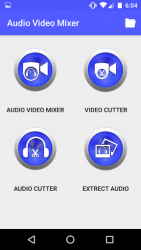
Our Add audio to video application is for changing background music of a video. With this video editor you can add or mix any audio to a video. With this Audio Video Mixer cum Video Cutter you can also trim video easily.
With our Audio Video Mixer Video Cutter you can also add audio to video easily. With our Audio Video Cutter app you can cut the best part of your audio song and save it in your device . The cut results are stored in "Audio Video Mixer" folder.
With our Audio Video Cutter app you can make your own MP3 ringtones fast and easy. Out Audio Video Cutter app is also a music editor and ringtone cutter. Steps to add audio to video. -> Open our Audio Video Mixer.
-> Click on Audio Video Mixer Button.
-> Trim Video by seek bar(Optional)
-> Click on Add Audio button and Select mp3 file.
-> Click Play button to preview ( Optional)
-> Click the top save tick button to merge audio and video together. - You can also mute the audio in video by clicking mute button. Steps to trim video. -> Open our Audio Video Mixer.
-> Click on Video Cutter Button.
-> Trim Video by seek bar.
-> Click Play button to preview ( Optional)
-> Click the top save tick button to trim video. Steps to trim audio: -> Open our Audio Video Mixer.
-> Click on Audio Cutter Button.
-> Select mp3/music from your mobile.
-> Select area to be chopped from your audio.
-> Save as mp3 file. Steps to extract audio from video or to get video to mp3: -> Open our Audio Video Mixer.
-> Click on Extract Audio Button.
-> Select video from your mobile.
-> Select area you want to save audio from your video file.
-> Save final mp3 file. Features: Simple and easy operation.
Preview the video before saving it.
You can share the created file on social media like whatsapp, facebook etc
You can delete the created files from the app itself.
Bug fix
Verdict
Audio Video Mixer Video Cutter is an Android application available under the Freeware license — the APK is 25.35 MB. We’ve catalogued it under Productivity.
At a glance
Help fellow users decide. Share your experience with Audio Video Mixer Video Cutter.