In depth
A closer look at Video to Mp3 Converter
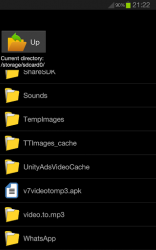
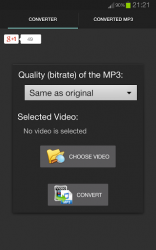
Video to Mp3 Converter is an easy tool to local videos from your device to Mp3 (Audio). Video to MP3 Converter provides an elegant and easy to use interface that allows you to browse through your files and select the video you want to convert to MP3 with just one click. Not only that, but also you can browse through converted files to play or share anytime! With Video to MP3 Converter you can simply open the video you want to convert from the file manager and choose to complete the action using video to MP3 converter in order to convert the video to MP3. How to use Video to MP3 Converter (Method 1):1- Open the application then click browse.2- Select the video you want to convert.3- Click convert. How to use Video to MP3 Converter (Method 2):1- Open your preferred file manager.2- Navigate to the video to convert and open it.3- Choose to complete the action using Video to MP3 Converter when prompted. Features:- Quality customization.
- Ease of use.
- Light weight.
- Play, share and manage your converted files. - Video to MP3 Converter uses ffmpeg and libmp3lame (LGPL) libraries as codec.
Verdict
Should you install Video to Mp3 Converter?
Video to Mp3 Converter is an Android application available under the
Freeware
license — the APK is 9.71 MB.
We’ve catalogued it under
Productivity.
✓
Verified clean. Every Video to Mp3 Converter APK on SoftLookup is scanned for malware, spyware, and adware. We re-test on every update.
Sponsored
At a glance
Video to Mp3 Converter specifications
- Publisher
- Linterna Apps
- Last updated
- May 4, 2026
- License
- Freeware
- Operating system
- Android
- File size
- 9.71 MB
- Price
- Free
- Page views
- 1237
Sponsored
Help fellow users decide. Share your experience with Video to Mp3 Converter.