Android · Free download · Productivity
Cx File Explorer1.1.1
- Operating system
- Android
- File size
- 4.36 MB
- License
- Freeware
- Last updated
- May 5, 2026
73 downloads·981 page views
Android · Free download · Productivity
73 downloads·981 page views
Screenshots
In depth
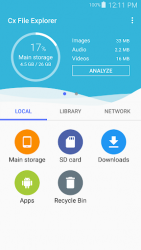
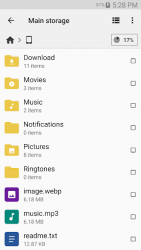
ey features Organize your files and folders: With a user-friendly UI, you can easily browse, move, copy, compress, rename, extract, delete, create and share files (folders) on both internal and external storage of your mobile device. Access files on cloud storage: You can manage the files on cloud storages. Access files on NAS (Network-attached storage): You can access files within remote or shared storage like FTP, FTPS, SFTP, SMB, WebDAV, and LAN. Also you can access your mobile dev ice from PC using FTP(File Transfer Protocol). Manage your apps: you can manage the apps installed on your mobile device. Analyze and manage your storage: Cx File Explorer provides visualized storage analysis so that you can quickly scan the available space and manage it. The Recycle bin also helps you easily manage your storage. Material Design interface: Cx File Explorer uses the Material Design interface. If you are looking for a file manager app that has simple and sleek interface with full features, Cx File Explorer would be the best choice.
A top-notch application for managing all the files and apps on your android in a fast and easy way. It lets you see all the text documents on your phone at a glance. Browse directories copy and paste files etc. How much free space you have on your android smartphone and how much memory is taken up by photos videos and audio files can be seen from the main tab of cx file explorer. A list of installed apps and a download folder can be accessed from here. The second tab shows all photos on your smartphone as well as videos text files and audio clips. The directories where these files are stored can be accessed by tapping on a category. Ppon the third and final tab you can connect your smartphone to a computer and manage files on the cx file explorer. For cloud storage you can also sync with your dropbox and drive accounts. File explorer for android is a great file browser with tons of useful features and a straightforward interface.
Verdict
Cx File Explorer is an Android application available under the Freeware license — the APK is 4.36 MB. We’ve catalogued it under Productivity.
At a glance
Help fellow users decide. Share your experience with Cx File Explorer.