In depth
A closer look at Solid Explorer - File Manager
This is Solid Explorer File and Cloud ManagerPlease note that this is a 14 day trial versionIf you own the Solid Explorer Unlocker you can use the premium version for free! New feature!Now you can protect your files and folders with a password. If your device has a fingerprint sensor you can use it to open encrypted files without a need to provide the password. The same applies for cloud storages, which can now be accessed with the fingerprint as well.
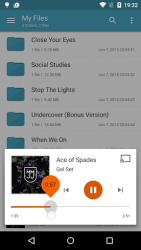
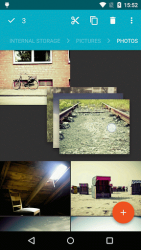
Two independent panels serving as file browsers- Rich customization options: icons sets, color schemes, themes- Drag and Drop inside and between panels- FTP, SFTP, WebDav, SMB/CIFS clients- Ability to read and extract ZIP, 7ZIP, RAR and TAR archives, even encrypted- Ability to create password protected ZIP and 7ZIP archives- Cloud file manager: Dropbox, Box, OneDrive, Google Drive, Sugarsync, Copy, Mediafire, Owncloud, Yandex- Root access makes Solid Explorer a fully functional root explorer- Extensibility: more features in separate plugins available in Google Play- Indexed search finds your files in a couple of seconds- Detailed file information with storage usage statistics- Batch rename: change names of multiple files at once using regular expressions and variables- Useful tools: hiding unwanted folders, FTP Server (plugin), bookmarks, Chromecast support, media browser Looking for a good file explorer with a sleek, modern look and many features? Good to see you here!Solid Explorer is the best looking file and cloud manager with two independent panels, which brings to you a new file browsing experience. This is the only fully featured file manager with Material Design you can find in the Play Store. It-s better, faster and solid when compared to the competition. Apart from the ability to manage files in almost every location, it also gives you many customization options, such as themes, icon sets and color schemes. You can freely adjust the interface to match your taste. Dual pane file browsing with drag and drop greatly increases your productivity. Solid Explorer is a great cloud file manager, because it provides you a wide support for cloud storages including Dropbox, Box, Google Drive, OneDrive, Mega and Owncloud. This file manager can also connect to your Windows PC and many remote servers working with FTP, SFTP and WebDav. By the way, you will appreciate the ability to create or extract most commonly used archive formats, such as ZIP, RAR and 7ZIP.Maybe you-re tired of ugly looking root explorer apps? This file manager will meet your needs. It features a root explorer with ability to change system level file properties. You don-t need to remember about mounting file systems as read/write. Solid Explorer will do it for you automatically. Solid Explorer is also a great file manager for viewing your media. It can arrange your photos, videos and music in one place for easy and quick access. It has a built in music player and image viewer, which even allow you to play remote content stored for example on your PC, Dropbox, OneDrive or Google Drive. The most cool thing is that the content can be casted to your Chromecast.
Verdict
Should you install Solid Explorer - File Manager?
Solid Explorer - File Manager is an Android application available under the
Freeware
license — the APK is 9.77 MB.
We’ve catalogued it under
Productivity.
✓
Verified clean. Every Solid Explorer - File Manager APK on SoftLookup is scanned for malware, spyware, and adware. We re-test on every update.
Sponsored
At a glance
Solid Explorer - File Manager specifications
- Publisher
- NeatBytes
- Last updated
- May 4, 2026
- License
- Freeware
- Operating system
- Android
- File size
- 9.77 MB
- Price
- Free
- Page views
- 1155
Sponsored
Help fellow users decide. Share your experience with Solid Explorer - File Manager.