See GOM Recorder - Voice and Sound Recorder in action
In depth
A closer look at GOM Recorder - Voice and Sound Recorder
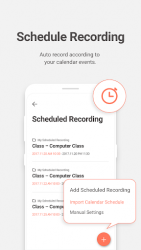
GOM Recorder is a smart voice recorder that provides 4 types of recording methods. Also, folder function makes easy to manage files after recording.Now, you can smartly record your daily life like lectures/meetings with Gom Recorder. Recording[Scheduled recording]- Appoint the time to start/end recording. - A recording will automatically start/end to match your schedule if linked to the calendar on your mobile.[Gesture recording]- Turn ON/OFF gesture recording function. When turned on, you can start recording by shaking your mobile. - Adjust the intensity of a shake starting gesture recording.[Speech to text recording]- Converts your voice into texts. - Makes taking minutes or lecture notes easy. [Widget recording]- One-touch recording enabled by background screen widget. [Basic recording- in the app]- Check the waveform before/during recording. - Check available recording time on my mobile. - Control the volume with microphone volume function before/during recording. - Edit files[Edit voice files]- Edit recorded voice files. - Delete unwanted parts of voice files. - Save edited voice files as overwritten files or new files. Folder and file management[Folder]- Choose a folder before recording for basic/scheduled recording. - Easily manage recorded files saving to the appointed folder after recording.[File]- Change file name before using recorder, otherwise, file name will be saved as the time and date of recording. - Saved audio files can be moved between folders. - Recorded files can be aligned by the time of recording/the order of file names. - Recorded audio files can be shared. - Search files easily with file search function. Format and recording audio quality management[Format]- Provides three kinds of formats; mp3, m4a, and wav.[Quality]- Able to set the quality of audio by format. - In-recording function- Choose not to answer calls during recording. - Set to continue recording with screen off. - Post-recording function- Provides a Mini Player to listen to audio files checking your list. - The embedded player supports skip functions. - Able to adjust playing speed. - Share and listen to recorded files with Gom Audio. - Able to place a bookmark anywhere you want. - Set the recorded file as the alarm, beep, or ringtone with an export function. - Please contact GOM customer centre anytime if you are experiencing any problems. (gomtv-gomgorp.com) - Access Agreement The following access authorities are required for services:Access authority is necessary for using the app. You can use basic recording and file management of GOM Recorder without granting access to optional permissions. [Microphone] Required for audio recording[Save] Required for saving as an audio file[Phone] Optional for Don-t Answer mode[Calendar] Optional for scheduled recording by calendar
Verdict
Should you install GOM Recorder - Voice and Sound Recorder?
GOM Recorder - Voice and Sound Recorder is an Android application available under the
Freeware
license — the APK is 10.04 MB.
We’ve catalogued it under
Productivity.
✓
Verified clean. Every GOM Recorder - Voice and Sound Recorder APK on SoftLookup is scanned for malware, spyware, and adware. We re-test on every update.
Sponsored
At a glance
GOM Recorder - Voice and Sound Recorder specifications