In depth
A closer look at Volume Control
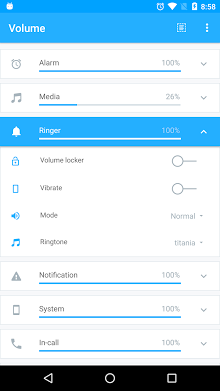
Volume Control is an amazing app that lets you take control of your devices volume instead of being controlled by it! HOW IT WORS Volume Control is extremely easy to use. Simply tweak existing or create new pre-defined volume profiles, and toggle between them with just a single touch. Individual profiles are comprised of: Alarm, Media, Ringer, Notification, Voice (in-call), Bluetooth and overall system volume. AUTOMATED CONVENIENCE Volume Control also detects when you insert headphones or activate Bluetooth, and automatically toggles to your preferred volume profile. You can even create automatic scheduled presets based on time of day, physical location, or a calendar event. For example, if you plan heading into a business meeting, simply tell the app to turn off your ringer at precisely that time. Of if you-re heading for a workout, tell the app to pump up the volume when you arrive at the fitness club. The list of possibilities is virtually limitless! ADDITIONAL SPECIAL FEATURES Here are some of the other special features you can look forward to:- Custom volume settings and ringtones for VIP contacts- The option of separating or linking ringer volume and notification volume- The ability to change ringtones for alarm, ringer and notifications- Notification shortcuts for quick and easy access to controls and presets- Integration with Tasker and Locale via the built-in preset plugin INTERACTIVE WIDGETS You can also access a fantastic suite of fully interactive Home Screen widgets, including:- Preset (apply a set of audio settings);- Preset List (apply any preset)- Volume Locker (change/lock volume levels)- Vibrate (toggle vibrate settings for ringer and notification)- Ringer (toggle the ringer mode between silent, vibrate, and normal)- Dashboard (various interactive volume controls) Please note: to access the widgets, the app should not be installed to your SD card. Some Android versions may require a reboot for widgets to appear on your widget drawer. AVOID ACCIDENTAL CHANGES Youll also love the cool-Pocket Lockerfeature, which automatically prevents accidental volume changes by locking volume settings when your device screen turns off. MULTIPLE LANGUAGE SUPPORT Arabic, Czech, Danish, German, Spanish, Finnish, French, Hindi, Hungarian, Italian, Japanese, orean, Malaysian, Norwegian, Dutch, Polish, Portuguese, Russian, Slovak, Swedish, Thai, Turkish, Ukrainian, Vietnamese, Simplified Chinese, and Traditional Chinese. PERMISSIONS Please note that the following permissions are required to use the app (the function/reasons are provided in brackets):- Full network access/view network connections (bug reporting, Google maps, usage).
- Read calendar (schedule presets based on calendar events)- Modify system settings (change advanced volume settings)- Coarse and fine location (detect location changes for scheduled presets- Control vibration (notifications)- Read/Write external storage (access custom icons and ringtones)- Run at startup (restore settings after startup)- Read phone state (required to separate the ringer and notification volume on all Android versions)
Verdict
Should you install Volume Control?
Volume Control is an Android application available under the
Freeware
license — the APK is 6.8M.
We’ve catalogued it under
Productivity.
✓
Verified clean. Every Volume Control APK on SoftLookup is scanned for malware, spyware, and adware. We re-test on every update.
Sponsored
At a glance
Volume Control specifications
- Publisher
- Developer
- Last updated
- May 5, 2026
- License
- Freeware
- Operating system
- Android
- File size
- 6.8M
- Price
- Free
- Page views
- 894
Sponsored
Help fellow users decide. Share your experience with Volume Control.