In depth
A closer look at Audio Recorder
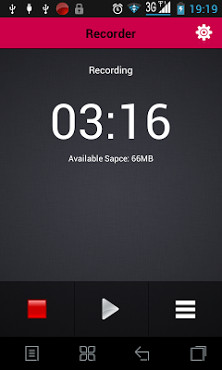
The best application for recording, HD quality Voice Recorder is a high quality voice recording application, store your recordings as voice memos and share them with your friends, this application uses the high quality (8-41.1Hz sample rate) to give you the best recording experience. This app is simple UI, instant start and easy to use. Features: 1. HD Audio recording. 2. Simple user interface, instant start. 3. All the required functionality is in one screen and within the user-s click. 4. Supported operations in this Version- Recording with high quality.
- Format file: mp3, ogg- Play, pause, stop audio file.
- Send/Share your recording.
- Microphone gain calibration tool- Save/pause/resume/cancel recording process control- Easy to use recordings list- Send/share a recording via email, sms, mms, facebook, whatsapp, dropbox, etc.
- Record by internal or external microphone- Not support call recorder- We are improve .wave format )- Delete your recording right from the app.
- Save the recording file.
- Live audio spectrum analyze- Sound effect (coming soon)- Mp3 encoding with adjustable sample rate (8-44 kHz)- Recording in background (even when display is off)- Time remain to tell you how long can you recorder- Cut music audio file (coming soon) 5. A timer to monitor your recording time.
Verdict
Should you install Audio Recorder?
Audio Recorder is an Android application available under the
Freeware
license — the APK is 4.1M.
We’ve catalogued it under
Productivity.
✓
Verified clean. Every Audio Recorder APK on SoftLookup is scanned for malware, spyware, and adware. We re-test on every update.
Sponsored
At a glance
Audio Recorder specifications
- Publisher
- Developer
- Last updated
- Feb 6, 2026
- License
- Freeware
- Operating system
- Android
- File size
- 4.1M
- Price
- Free
- Page views
- 1124
Sponsored
Help fellow users decide. Share your experience with Audio Recorder.