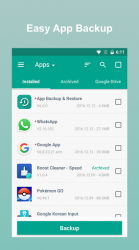
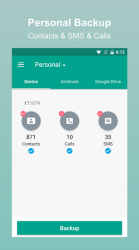
See App / SMS / Contact - Backup and Restore in action
In depth
A closer look at App / SMS / Contact - Backup and Restore
App Backup Restore use accessibility services to improve auto uninstall feature in some devices.Auto Backup, Restore, Transfer your Apps and Personal data for FREE.App Backup Restore Transfer is a simple apk assistant. App Backup Restore Transfer CANNOT back up or restore your appsdata, its a apk assistant that can back-up apk files only.Easiest Backup - Restore AppsمContactsمSMSمCall logs to Internal storage of phone / External SD card. Upload - Download backups to Google Drive .Never lose your data again! App Backup Restore- Transfer can Backup - Restore apk files of apps that are not frequently used to save storage of phone. Easiest Backup - Restore multi versions to avoid unnecessary updates.Backup - Restore Personal data for safety. iCloud Backup - Restore for data security. Transfer - Share AP files between Android devices. - Editor-s ChoiceNo.1 in -10 best Android back up apps - to backup Androidsave storage of phone !- Android AuthorityNo.1 Easy Backup - Restore apk assistant in-10 Best Android Backup Apk assistant- Toms Guide —ˆ Local / Cloud Backup - Restore - AP backup - restore- Contacts backup - restore- SMS backup - restore- Call logs backup - restore —ˆ Transfer - Share in Seconds- AP send - receive- Contacts send - receive- SMS send - receive- Call logs send - receive —ˆ Features Batch backup, restore, transfer, share Batch Backup - Restore to internal storage of phone by default Batch Backup - Restore to SD card or USB Upload - Download to/from Google Drive, Dropbox, etc. Easiest Backup - Restore apks, personal data Auto Backup - Send files to the third party platforms Extract - Retrieve AP files Transfer - Share Backups Overwrite, downgrade app versions Auto app-backup tool at all times Set auto backup list to back up apks automatically Transfer - Share by building private Wifi-hotspot Wireless Transfer - Share with dizzying speed Auto backup - update with notifications Google Drive upload/download with notifications Easiest backup - restore system applications Scan AP files stored in your phone Scan virus for more protection Touch - Hold app to check details Manage apps by installed, archived, Drive Apk assistant to sort apps by name, date, size Show backups size - time - version Show used - total system - file storage Recover phone after factory resetting, Samsung, MicroMax, etc. supported All types of app supported including Game, Tool, Social Media etc. Notice:App Backup Restore- Transfer CANNOT back-up, restore, transfer data or settings of apps, it only batch backup - restore apk files to save storage of phone.App Backup Restore- Transfer can only restore app files that have been backed up BEFORE.App Backup Restore- Transfer CANNOT auto back up personal data, auto back-up apks only.App Backup Restore- Transfer can only auto back-up to RAM - SD card, auto backup to cloud CANNOT be achieved .Please back up to sd card or cloud before factory reset, or all backups will be deleted due to system restriction.For Android 4.4 and above, Google reserved the permission to write in SD card. It is now granted only to Google and cellphone manufactures. Requested
Verdict
Should you install App / SMS / Contact - Backup and Restore?
App / SMS / Contact - Backup and Restore is an Android application available under the
Freeware
license — the APK is 5.96 MB.
We’ve catalogued it under
Productivity.
✓
Verified clean. Every App / SMS / Contact - Backup and Restore APK on SoftLookup is scanned for malware, spyware, and adware. We re-test on every update.
Sponsored
At a glance
App / SMS / Contact - Backup and Restore specifications