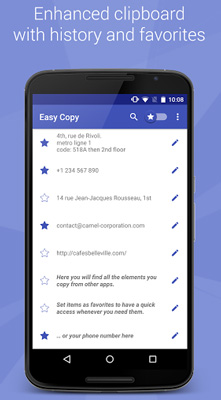
The fastest way to copy - paste in all your apps! With Easy Copy, you will save time with your copy- paste! Enjoy your smart clipboard! Note: Unfortunately the Facebook app does not authorize the copy function to copy messages, comments or statuses so you will not be able to use Easy Copy to get around that limitation. But you can check out our other app Universal Copy that goes around that limitation for Facebook, Instagram, Tumblr
Easy Copy has 3 main features to improve the standard Android Copy Paste feature:- Copy in 1-Tap to perform quick actions (translate, locate, share) from all the apps- An enhanced clipboard to save your copied items and manage your favorites- A Paste feature accessible from all your apps which allows you to paste anything from your clipboard in 1-Tap- Copy: In all your apps, the Easy Copy popup will appear whenever you copy something, allowing you to select quick actions:- locate in Google Maps- send by text or email- call the number- translate with Google Translate- create an event- modify the text you copied (very useful in Hangouts when you only want to copy part of a message!)- share (when not already implemented in the given application)- add your own custom actions to open any app- Enhanced Clipboard: Easy Copy automatically saves everything you copy. Add favorites and use copied elements again and again!- Create favorites to access them quickly- Use and reuse the items of your clipboard- Search in all your copied items- Edit or delete the items you copied- Paste: In all your apps, access the Easy Copy clipboard via the notification bar to quickly paste items! When you focus a text zone, just open the notification bar, choose the Easy Copy entry to open the clipboard. Then simply select the item you want to paste and it gets automatically pasted into your text zone! Easy Copy+: Upgrade to the + version to enjoy the full Easy Copy experience: . large number of items and favorites in the clipboard . No ads . Show us your support and help us make it an awesome app! Easy Copy is a very useful tool that simplifies Copy Paste on Android, for work purpose or personal usage! Don-t hesitate to rate us 5 stars and spread the word if you like it!
Verdict
Should you install Easy Copy - The smart Clipboard?
Easy Copy - The smart Clipboard is an Android application available under the
Freeware
license — the APK is 4.6M.
We’ve catalogued it under
Productivity.
✓
Verified clean. Every Easy Copy - The smart Clipboard APK on SoftLookup is scanned for malware, spyware, and adware. We re-test on every update.