
Android · Free download · Productivity
WO Mic3.1
- Operating system
- Android
- File size
- 1.2M
- License
- Freeware
- Last updated
- May 5, 2026
63 downloads·935 page views
Android · Free download · Productivity
63 downloads·935 page views
Screenshots
In depth
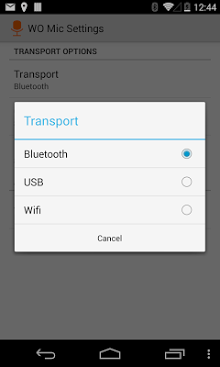
A tool that gives you the possibility to turn your android device into a microphone for the computer is pwo mic. With it there is no need to use any device that requires a wired connection unless you prefer it. Wo mic offers different ways to connect your terminal wirelessly via bluetooth or wi-fi. In addition as we have already indicated you will also have the option of using a usb drive. However it will be enough to install the application on your device and link it to your pc via any of these ways. The interface of the wo mic is quite simple which will allow you to complete the process without any difficulty. Sobald the tool has been installed click on the gear icon in the upper right corner and modify the relevant parameters from the settings screen. The volume of the microphone however can only be changed if you subscribe to a certain service. A similar principle applies to advertising. It's possible to delete them only if you create an account. The wo mic is a handy solution if you don't have a microphone in your computer.
Verdict
WO Mic is an Android application available under the Freeware license — the APK is 1.2M. We’ve catalogued it under Productivity.
At a glance
Help fellow users decide. Share your experience with WO Mic.