In depth
A closer look at My nScreen
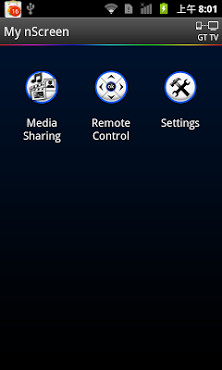
In the cloud technology era, it realizes the interconnectivity and interoperability between TV and smart mobile phone. My nScreen is multi-screen interaction application which contains Media sharing , Remote control and other applications . Through Media Sharing application , you can share the video / music / picture in your smart phone to TV with your family - friend , and you can use the smart phone as a remote control unit to operate TV by Remote Control application . Detail steps of media sharing: 1.Click-My nSreenon phone. Connect phone with TV via same Wi-Fi;(not same Wi-Fi ,should be same Home network) 2.Click-Media Sharingto browse media files; 3.Send media to TV to playback. (with one of the following options) a)Drag - Drop folder/file to the TV icon on top of the screen; b)Swing phone towards TV to launch the first file; c)Play the media on phone and click the TV sharing icon; 4. While playing on TV, shake the phone to play previous or next file Detail steps of Remote Control 1. Click-My nScreenon phone. Connect phone with TV via same Wi-Fi; 2. Click-Remote Controlto operate TV.
Verdict
Should you install My nScreen?
My nScreen is an Android application available under the
Freeware
license — the APK is 7.3M.
We’ve catalogued it under
Productivity.
✓
Verified clean. Every My nScreen APK on SoftLookup is scanned for malware, spyware, and adware. We re-test on every update.
Sponsored
At a glance
My nScreen specifications
- Publisher
- Developer
- Last updated
- Feb 7, 2026
- License
- Freeware
- Operating system
- Android
- File size
- 7.3M
- Price
- Free
- Page views
- 990
Sponsored
Help fellow users decide. Share your experience with My nScreen.