In depth
A closer look at Screen Notifications
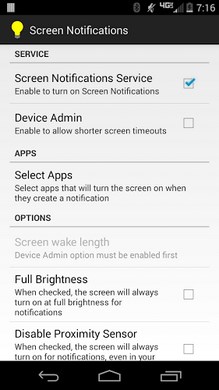
A very simple app that turns your screen on for a specified period time when you get a notification. Optionally if your device is in your pocket or the proximity sensor is otherwise covered, the screen will not turn on.
Screen Notifications is open source.
Uninstalling
If you have enabled Screen Notifications as a Device Admin so the screen will turn off after a notification, in order to uninstall Screen Notifications you will need to first open the app and uncheck the Device Admin option. Once this is done you will be able to uninstall it. HTC One Users
There is a bug in the HTC lockscreen that will cause the shortcuts to break and the lockscreen to be dismissed without unlocking. The affects all apps that use the accessibility service (Lightflow, Pebble, etc)
forums.getpebble.com/discussion/5018/pebble-seems-to-break-htc-one-lock-screen-icons If your phone is speaking, try disabling Samsung TTS and Google TTS in your devices menu or check for an update to your device. This is a known Samsung bug they have started to fix
Verdict
Should you install Screen Notifications?
Screen Notifications is an Android application available under the
Freeware
license — the APK is 353k.
We’ve catalogued it under
Productivity.
✓
Verified clean. Every Screen Notifications APK on SoftLookup is scanned for malware, spyware, and adware. We re-test on every update.
Sponsored
At a glance
Screen Notifications specifications
- Publisher
- Developer
- Last updated
- Feb 12, 2026
- License
- Freeware
- Operating system
- Android
- File size
- 353k
- Price
- Free
- Page views
- 931
Sponsored
Help fellow users decide. Share your experience with Screen Notifications.