In depth
A closer look at Rotation - Orientation Manager
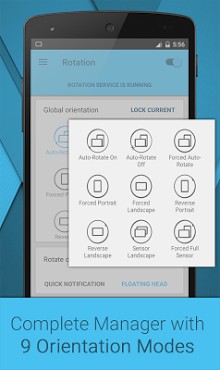
FEATURES Supported modes System default modes - Auto-Rotate On - Auto-Rotate Off Modes to override system settings - Forced Auto-Rotate - Forced Portrait - Forced Landscape - Reverse Portrait - Reverse Landscape - Sensor Landscape - Forced Full Sensor Lock Current:- Lock current orientation Per App Settings - Set orientation for individual apps - Set Lock screen, Phone call, Charging, Headset and Dock orientation - Android 5.0 (L/Lollipop) supported # Rotate on demand - Floating head: Fully customisable head on top of every app to change foreground orientation - Quick notification: Change foreground orientation from notification Notifications - Enable for uninterrupted service - Select click action - Add toggles to change orientation quickly Widgets - Service widget: Toggle service - Mode widget: Toggle between two selected modes - Dynamic widget: Add toggles according to your need - Lock screen support (Android 4.2.2+) User Interface - Light and dark base themes inspired from Material UI - Theme accents with support for Xperiatheme accents Other features # Rotation Automate:- Tasker / Locale plugin support to automate over 20 actions - Rotation Shortcuts:- Add fully customisable shortcuts to your home screen - Start on boot:- Start rotation service on boot - Vibration:- To notify when screen orientation changes with customisable vibration length - Help and Info:- Detailed info about orientation modes and easy to understand Tutorial In-built support # Backup and Restore - Restore defaults - Restart app - Uninstall option Features marked with # are free for 7 days. After that Rotation ey is required. PERMISSIONS Usage statistics (5.0+): For per app settings Retrieve running apps: For per app settings Modify system settings: To change system settings Draw over other apps: To change foreground orientation Run at startup: To start service when device boots up Vibration: To vibrate device when orientation changes Modify USB storage: To create and restore backup (nothing else) NOTICE- Ad free- No internet and root required- Some apps might not work properly when forced to work on portrait/landscape mode. Use Auto-Rotate On/Off from Per App Settings to use system settings for those apps.
- Contact me, if you want to translate.
- Please write reason also if you are giving Bad rating. I don-t believe in ads. Buy Rotation ey if you want to support. Promo Video by Max Patchs Android is a trademark of Google Inc. Xperiais a registered trademark of Sony Mobile Communications AB Use your device in any orientation with most intuitive and customisable manager! Rotation Lets You Take Full Control of Your Devices Orientation Settings. -XDA Developers Incredibly complete, professional and polished app. -Phone Arena Rotation on demand lets you select screen rotation on the fly without having to switch to the app first. -addictivetips Support and News on Facebook:- facebook.com/rotationpranavpandey Google+ community:- plus.google.com/u/0/communities/102375426106430185677
Verdict
Should you install Rotation - Orientation Manager?
Rotation - Orientation Manager is an Android application available under the
Freeware
license.
We’ve catalogued it under
Productivity.
✓
Verified clean. Every Rotation - Orientation Manager APK on SoftLookup is scanned for malware, spyware, and adware. We re-test on every update.
Sponsored
At a glance
Rotation - Orientation Manager specifications
- Publisher
- Developer
- Last updated
- Jan 29, 2026
- License
- Freeware
- Operating system
- Android
- Price
- Free
- Page views
- 1073
Sponsored
Help fellow users decide. Share your experience with Rotation - Orientation Manager.