In depth
A closer look at AudioBar Media Volume Widget
Go to your WIDGET screen to install. There is no app required in the app section.
Media Volume Control Widget for quick and easy music volume control. Designed with music in mind, this product aims to give you the best audio media volume control experience on the android.
The volume control is for MEDIA VOLUME ONLY. It has no effect on ringer, notification or system volume settings. Features:
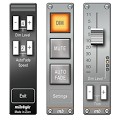
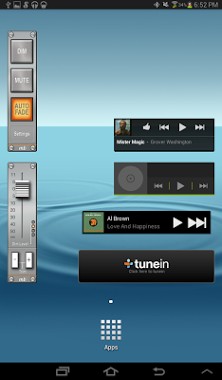
Immediate onscreen control. Designed to be used in conjunction with music media streaming widgets.
The further you tap from fader, the further it moves. This helps achieve the volume you want quickly.
Dim Button: With 4 dim Levels.
Mute button.
Autofade: Fades out whatever is currently playing, stops audio stream and returns to original level.
4 Autofade Speeds.
Horizontal and vertical widgets included, depending on screen needs.
Quick access PanelFlip for Settings.
No network/internet permissions required.
2 Separate Widgets: One volume control and one quick button control.
No ads. This is a new release, we have tried to ensure it works on as many devices as possible, but if you experience any problems please dont hesitate to send us an email info.milobyte-gmail.com and we will resolve any problems as soon as possible.
The MiloByte team.
Verdict
Should you install AudioBar Media Volume Widget?
AudioBar Media Volume Widget is an Android application available under the
Freeware
license — the APK is 1.0M.
We’ve catalogued it under
Productivity.
✓
Verified clean. Every AudioBar Media Volume Widget APK on SoftLookup is scanned for malware, spyware, and adware. We re-test on every update.
Sponsored
At a glance
AudioBar Media Volume Widget specifications
- Publisher
- Developer
- Last updated
- Jan 29, 2026
- License
- Freeware
- Operating system
- Android
- File size
- 1.0M
- Price
- Free
- Page views
- 1030
Sponsored
Help fellow users decide. Share your experience with AudioBar Media Volume Widget.