In depth
A closer look at IDrive Online Backup
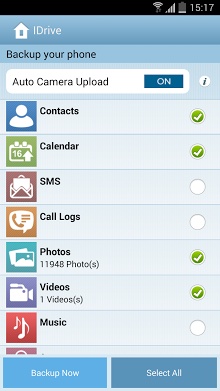
Protect your digital life with IDrive! IDrive for Android securely backs up your mobile data with Private ey Encryption &- the highest level of data security available &- so only you can access your files. You can backup multiple devices to one account, and sync files across your devices to access your data from anywhere. IDrive introduces Local backup using the IDrive Wi-Fi device- a complementary solution to online backup. Local backup solves the biggest problem with cloud backup slow restores. With local backup, you can restore your data really fast! Protect some of your data for free, or choose the IDrive large Mobile plan and get large backup for up to 5 mobile devices for only $4.99 per year! Features: Backup and Restore contacts, photos, videos, calendars, texts, apps, and documents (including .doc, .pdf, .zip and more) with a single tap. Local backup for faster restores via the IDrive Wi-Fi device Easily sync files between all linked devices. Link your devices to a single account and access your data from anywhere. Instagram and Facebook Backup. Selectively backup and restore files. Share files and folders over a single, secure link. Automatic upload option protects your photos and videos as soon as they are taken via wifi or cellular data. Schedule recurring backups by day and time. Gallery View allows you to easily slide through all your pictures and videos. Security features: 256-bit AES encryption Private key encryption ensures only you have access to your data Lock app with a passcode Easily unlink devices which are lost or stolen Information on permissions: Read and Edit your text messages is required to backup and restore text messages. Network access, network and wi-fi connections is required to reach wi-fi and cellular network for backing up your data. Read, add or modify Calendar Events is required to backup and restore calendar. To read/write Call Logs and Contacts is required to backup, access, and restore your call history and contacts. Read Phone is required to get the device ID which helps distinguish your device. Accounts is required for accessing Play Store for making in-app purchases. Prevent device from sleeping is required so that device doesn-t go to sleep while backup/restoring is being performed. Run at startup is required to run scheduled backups.
Verdict
Should you install IDrive Online Backup?
IDrive Online Backup is an Android application available under the
Freeware
license — the APK is 8.1M.
We’ve catalogued it under
Productivity.
✓
Verified clean. Every IDrive Online Backup APK on SoftLookup is scanned for malware, spyware, and adware. We re-test on every update.
Sponsored
At a glance
IDrive Online Backup specifications
- Publisher
- Developer
- Last updated
- Feb 2, 2026
- License
- Freeware
- Operating system
- Android
- File size
- 8.1M
- Price
- Free
- Page views
- 1208
Sponsored
Help fellow users decide. Share your experience with IDrive Online Backup.