In depth
A closer look at Toolbox for Android
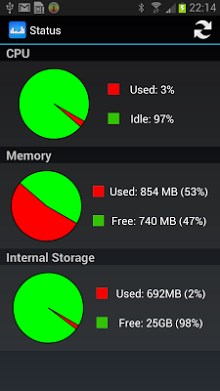
Toolbox for Android is an all-in-one toolbox for your android phones! It includes information about your hardware - software, and tools to optimize your phone use. This app is very easy to use and has very user-friendly user interface. The features are listed as follows: 1. Hardware information: CPU cors, CPU type, memory and storage info, screen resolution etc. 2. Software information: - List user-installed and built-in apps with the phone. - Provide details about each app including package name, version code and apk size. - Launch and uninstall apps from within this app. 3. Network information: - wifi and mobile network info, including IP address, wifi speed, MAC address etc. - telephony info, such as SIM type, phone number, network operator and IMEI. 4. Status: status info about RAM, ROM and CPU usage. 5. Battery: - Battery type, voltage and level. - Settings related to battery life. One-click wifi, data, bluetooth and screen settings. 6. Cleaner: - Clean app cache. - Clean call log. - Clean search history. - Clean SMS/MMS. 7. Volume Control: Provide quick access to volume change under different profiles. 8. Flashlight: one-click flashlight.
Verdict
Should you install Toolbox for Android?
Toolbox for Android is an Android application available under the
Freeware
license — the APK is 4.0M.
We’ve catalogued it under
Productivity.
✓
Verified clean. Every Toolbox for Android APK on SoftLookup is scanned for malware, spyware, and adware. We re-test on every update.
Sponsored
At a glance
Toolbox for Android specifications
- Publisher
- Developer
- Last updated
- May 5, 2026
- License
- Freeware
- Operating system
- Android
- File size
- 4.0M
- Price
- Free
- Page views
- 984
Sponsored
Help fellow users decide. Share your experience with Toolbox for Android.