In depth
A closer look at Storage Analyser
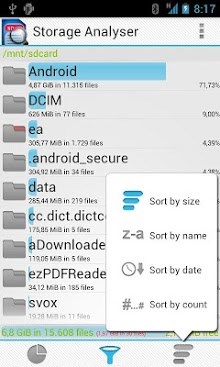
Storage Analyser can: . Analyses Sdcard, external Sdcards, USB storage devices, system partitions (disabled by default)- . Order the content by size, the amount of files, the date or just the name . See the space used by applications using App2SD (.android_secure folder). . Include or exclude folder from the mediascan of the Android Gallery. . Filter out the content you are aware of to make the rest more noticeable. . Delete no longer necessary data directly from the app. No need for external file managers. . Copy and Move files directly from the App. . Real tablet support. . Allows several columns depending on the screen size. . Shows which already removed application left over some data in /sdcard/Android/data/ and /data/data If you have issues with this application, please HELP to make it better by filing a bug report by mail (or via the Android internal bug reporting).
Verdict
Should you install Storage Analyser?
Storage Analyser is an Android application available under the
Freeware
license — the APK is 1.6M.
We’ve catalogued it under
Productivity.
✓
Verified clean. Every Storage Analyser APK on SoftLookup is scanned for malware, spyware, and adware. We re-test on every update.
Sponsored
At a glance
Storage Analyser specifications
- Publisher
- Developer
- Last updated
- Feb 3, 2026
- License
- Freeware
- Operating system
- Android
- File size
- 1.6M
- Price
- Free
- Page views
- 990
Sponsored
Help fellow users decide. Share your experience with Storage Analyser.