Android · Free download · Productivity
EZCast2.4.27
- Operating system
- Android
- File size
- 43.43 MB
- License
- Freeware
- Last updated
- Feb 18, 2022
41 downloads·886 page views
Android · Free download · Productivity
41 downloads·886 page views
Screenshots
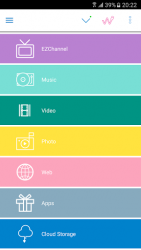
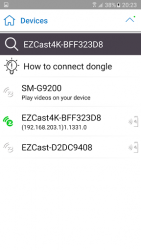
In depth
EZCast devices, in the forms of dongles or boxes, are the remote-free cross-platform (iOS, Android, Windows, and Mac) wireless display products, which receive and display the contents you love from internet and your own portable devices (smartphones, tablets, notebook and Mac). EZCast APP for Android, developed by WinnerWave, displays documents and multimedia from Internet or your Android Pads/Smartphones wirelessly in cooperation with EZCast devices. In addition, EZCast APP switches wireless display standards (DLNA, Miracast) and control the setting through remoting the EZCast devices. Since March 15, 2014 (App version 1.1.159+), EZCast APP (both Android/iOS version) supports Chromecast dongles and Android EZCast receivers. Now Chromecast and Android dongle users can use EZCast to cast documents, multimedia from your devices, internet, cloud storages and social networks to the large display. Check www.iezvu.com for complete user manual and related information. Please report your issues by EZCast Comment function (Comment icon on the EZCast desktop). We will check the issues and answer you directly. Requirements:
Android 4.2+ above(1GHz CPU and 1GB+ DDR are prefered) An EZCast dongle or box Supports:
Local photo display, Local Music/Video Streaming
Web browsing and Internet Video Streaming
Office document presentation
DLNA as a render (DMR)
Miracast mirroring
Setting control for the EZCast devices Current Possible Connections are as follows: Android/iOS/Windows/Mac/Windows Phone EZCast App to EZCast dongles/boxes
Android/iOS EZCast App to Chromecast dongles
Android EZCast App to EZCast Screen App in Android devices (iOS version will be soon released) Airplay/DLNA/Miracast to EZCast dongles
Airplay to EZCast Screen App in Android device.
EZCast, Happy Casting If you encounter error code 963 / 903 from google play:
1) Clear the application Cache / Data for the Google Play Store and Google Play Services through the Application Manager in Settings.
2) Reopen the Play Store, navigate to Settings and scroll to the bottom of the page, if you're on build 5.5.12, you're O to proceed. If your device is on an older revision, please wait a bit until the Play Store automatically pushes the latest build to your device.
3) Navigate to Settings -> Storage and select: "Unmount SD Card"
4) Navigate back to the Play Store and attempt to download updates, or any other application /game you were previously having issues downloading.
5) Observe the results, if the problem goes away, great! If not, try physically taking the SD card out of your device, rebooting and following all of the above steps in order.
Verdict
EZCast is an Android application available under the Freeware license — the APK is 43.43 MB. We’ve catalogued it under Productivity.
At a glance
Help fellow users decide. Share your experience with EZCast.