In depth
A closer look at Volume Control Widget
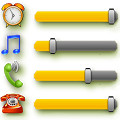
A-Volume Widget allows instantly see on your desktop and quickly adjust the current volume levels of alarm, media player, voice call, ringer and system notifications. Widget displays the current volume levels, regardless of the way in which they were set. The minimal widget size is only 1?1. Widget is resizable- you can increase it-s size if you want (for Android 3.1+ only! Long touch on the widget and change it-s size). Click on the Widget and set the volume level of any channel(s) in one touch! Vibrate mode setting supported. Quick open, set and close. In Settings you can choose audio channels to display in the widget and channels to adjust. Also you can adjust border, hue and transparency of the widget-s background to fit well your home screen theme. Install it from the market, then install manually the widget to the desired location of the desktop in standard way for your device:- Long touch on your home screen or click the menu button;- Choose Add;- Click on Widgets;- Choose the A-Volume Widget. If A-Volume Widget is not in the widgets list:- Make sure that it-s installed into internal memory! Widgets do not work from SD card;- Restart your system
Verdict
Should you install Volume Control Widget?
Volume Control Widget is an Android application available under the
Freeware
license — the APK is 257k.
We’ve catalogued it under
Productivity.
✓
Verified clean. Every Volume Control Widget APK on SoftLookup is scanned for malware, spyware, and adware. We re-test on every update.
Sponsored
At a glance
Volume Control Widget specifications
- Publisher
- Developer
- Last updated
- Feb 17, 2026
- License
- Freeware
- Operating system
- Android
- File size
- 257k
- Price
- Free
- Page views
- 1256
Sponsored
Help fellow users decide. Share your experience with Volume Control Widget.