In depth
A closer look at App Usage Manager
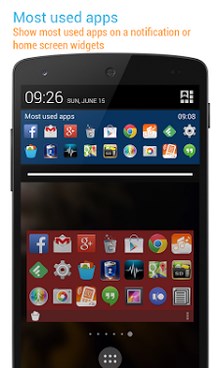
App Usage Manager (a.k.a Batch Uninstaller) is the most easy to use but powerful application management app. It Provides the following key features: . Show app usage history: gather the usage time about apps that you used . Track all installs: keep track of all installs and uninstalled apps . Manage apps: 1-tap to uninstall apps, sort apps by various option . Over-use reminder: remind when you spend on apps for a long time . App install reminder: notify when apps installed and the summary of daily installed apps . Most used apps- show most used apps on widgets or a notification WHAT USERS ARE SAYING- The ability to efficiently multitasking with this app is like no other! My favorite part is that before uninstalling apps, you can measure their usage and data by so many different statistics! (Jourdan Rystrom)- This application, not yet known, a remarkable air. Function, very original, its beautiful visual and display modes to manage its applications, promise him I hope, a very bright future. (Patrice Luengo)- This app is like all of Sam-s apps. They are all almost perfect (deserve 5 Stars) in doing what Sam describes that they will do. His descriptions are thorough - leave little to be desired in telling the potential user what to expect prior to DLing. Apps are easy to use with simple - up-to-date UIs. His AppMgr Pro III is untouchable on Google Play. Other GOODIES= 3D Compass+, 1Tap Cleaner, aCurrency, etc. (Thom Beebo) FEATURES . App usage history . Most used apps . Over-use reminder . App installation history . App install reminder . eep track of uninstalled apps so you can install them later . Batch uninstall apps . Root uninstaller, 1-tap to uninstall apps, rooted device required . Add personal notes for each app . Sort apps by name, usage time, access count, update time or size . Show apps in multi-column view . Batch clear apps cache or data . Batch show the App info window of selected apps . Batch view apps on Google Play . Easy search apps by name . Share the apps list with friends > SHOW APP USAGE HISTORY Do you know how much time you spend on Facebook, Candy Crash or Angry Birds app? Do you know the total use time of a day or average use time of an app? This function lists the usage time of apps by you preferred sorting order. This usage information is helpful for you to check which apps should be uninstalled as they are not used. It can also be used for spying whether an app has been used by someone else. > TRAC ALL INSTALLS Do you know which app has been installed or uninstalled without getting your confirmation? Do you know how frequent updates of an app? This function tracks and lists the history of all installed and uninstalled apps by you preferred sorting order. It-s convenient for you to track how many apps updated in a day, and how frequent updates of an app. > MANAGE APPS Do you know which apps that are not used for a long time? You can get more available space by uninstalling apps, but which one is bloatware? This function lists apps by app name, usage time, access count, update time or size, and allows you to uninstall apps easily and quickly. > OVER-USE REMINDER This function reminds you when you spend on apps for a long time. > APP INSTALL REMINDER This function reminds you when an app installed and the summary of daily apps installation. > MOST USED APPS This function shows a list of your most used apps on widgets or system notification.
Verdict
Should you install App Usage Manager?
App Usage Manager is an Android application available under the
Freeware
license — the APK is 2.1M.
We’ve catalogued it under
Productivity.
✓
Verified clean. Every App Usage Manager APK on SoftLookup is scanned for malware, spyware, and adware. We re-test on every update.
Sponsored
At a glance
App Usage Manager specifications
- Publisher
- Developer
- Last updated
- May 4, 2026
- License
- Freeware
- Operating system
- Android
- File size
- 2.1M
- Price
- Free
- Page views
- 886
Sponsored
Help fellow users decide. Share your experience with App Usage Manager.