In depth
A closer look at Kingsoft Clip Office Tool
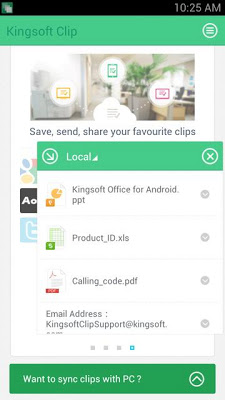
Free to manage your clipboard and sync clips with PC! . Copy - Paste easily between multiple application. . Transfer any format files between PC and android devices. . Store clipboard history and paste multiple clips at the same time. . Collect your favorite web links. . Share clips with friends. . Sync text between PC and android devices. . The special floating window design makes it more convenient to use. . Nice - Friendly interface. RECOMMENDED FEATURE : Are you still using the USB data line or cloud storages? Now you can get rid of the shackle of them! ingsoft Clip can help you transfer files wirelessly between PC, tablet and mobile phones, no matter office files, images or videos. Whats more, it is easy to use without registration. ingsoft Clip is a powerful clipboard manager with sync features. No matter phone or tablet, it can automatically store texts that you have copied. Just open ingsoft Clip from the notification bar to view, select, share, send and clear old clips. You can even transfer files and sync clips between your phone, tablet and PC. With that you can manager your clips anywhere, anytime and any devices. Currently you can send clips to cloud for syncing. You can send 20 clips for free, and if you want to send more, you can purchase quantity in the application
Verdict
Should you install Kingsoft Clip Office Tool?
Kingsoft Clip Office Tool is an Android application available under the
Freeware
license — the APK is 1.1M.
We’ve catalogued it under
Business.
✓
Verified clean. Every Kingsoft Clip Office Tool APK on SoftLookup is scanned for malware, spyware, and adware. We re-test on every update.
Sponsored
At a glance
Kingsoft Clip Office Tool specifications
- Publisher
- Developer
- Last updated
- Feb 3, 2026
- License
- Freeware
- Operating system
- Android
- File size
- 1.1M
- Price
- Free
- Page views
- 1208
Sponsored
Help fellow users decide. Share your experience with Kingsoft Clip Office Tool.