In depth
A closer look at Heads-up Notifications
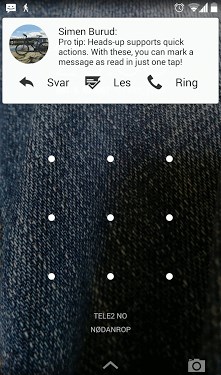
With this app, any device can get the heads-up notifications introduced in the new Android 5.0-L Developer Preview, no root required. But according to Addictivetips (and a lot of the users), this app has done more than just replicate a feature of Android L. Even if you arent dying to try Android L and some of its new features, this app is worth a try. FEATURES: Displays notifications as a floating popup Easily control which notifications to display Quick actions: mark messages as read in one tap (Android 4.1+, doesn-t work with all devices and apps) Display the heads-up on lock screen as well Battery friendly! (Email me if you notice significant battery consumption after installing) Choose how long you want the notifications to display Pocket detection / active display (causes a tiny increase in battery usage if you get a ton of notifications) Display notifications on the lock screen until dismissed Privacy on the lock screen Multiple themes Choose popup positioning and opacity Don-t display heads-up while using certain apps Display a popup for the currently playing song Compact/expandable mode Full notification UPCOMING FEATURES: Reminder after X minutes User-submitted themes Answer SMS directly from the popup Multiple notifications More customization options LANGUAGES: Heads-up notifications is available in 14 languages: English Russian Chinese Chinese French Spanish German Italian Portuguese Polish Serbian Bulgarian Swedish Norwegian If you want to help translate, you can find all the strings used in Heads-up here: goo.gl/Z732Ex While it-s not translated into any of these languages, it also supports notifications in right-to-left languages. COMMON ISSUES: If no popups appear, please make sure that Heads-up shows up in the list of running services. If it doesn-t, make sure you have enabled the service, and then reboot the phone. If your device is running Android 4.2 or earlier, and you have other accessibility services running (such as Pushbullet), they might block Heads-up from receiving your notifications. Please try to disable them if Heads-up doesn-t work. Huawei, XIAOMI and MIUI users: please allow Heads-up to display popups under Settings > Apps > Downloaded > Heads-up. It might also be necessary to reset the app data/settings. Uninstalling: If you find that the uninstall button is disabled, go to Settings > Security > Device administrators > Heads-up, and tap Disable. CONTACT: Problems, feature requests or questions? Feel free to contact me at sb-simen.codes If the app crashes, please tap ‘Report-, then ‘Send-. This makes it far easier for me to find and fix bugs.
Verdict
Should you install Heads-up Notifications?
Heads-up Notifications is an Android application available under the
Freeware
license — the APK is 699k.
We’ve catalogued it under
Productivity.
✓
Verified clean. Every Heads-up Notifications APK on SoftLookup is scanned for malware, spyware, and adware. We re-test on every update.
Sponsored
At a glance
Heads-up Notifications specifications
- Publisher
- Developer
- Last updated
- Jan 29, 2026
- License
- Freeware
- Operating system
- Android
- File size
- 699k
- Price
- Free
- Page views
- 798
Sponsored
Help fellow users decide. Share your experience with Heads-up Notifications.