In depth
A closer look at Screen Lock App
Consider Screen Lock Pro- to support our development
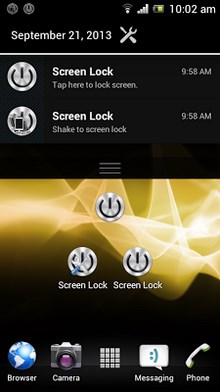
Screen Lock, app for Android, with animation (includes Old TV style) to suite your choice. It allows you to switch off the screen, and lock the device. Easy to use and saves power button usage. Animation speed is adjusted with transition animation scale as set in your device. If you set it to .5x its becomes faster, if you increase it, animations become slower. Our advice, use 1x for best experience. No force lock, it just locks smoothly even in Android 4.0.x and above without screen flickering.
To lock screen, you get various options:
1. Create shortcut to screen lock app
2. Use the screen lock widget
3. Enable in notification area
4. Enable shake to lock screen
5. Enable screen on and off (Pro only)
6. Access screen lock, by long pressing search button, if your device has it
Screen Lock features include:
1. Lock device with one touch
2. Animation when you lock
3. Shake lock can be delayed for your convenience
4. Screen On and Off for busy people (Pro only) [Use Calibrate device to activate]
Verdict
Should you install Screen Lock App?
Screen Lock App is an Android application available under the
Freeware
license — the APK is 249k.
We’ve catalogued it under
Productivity.
✓
Verified clean. Every Screen Lock App APK on SoftLookup is scanned for malware, spyware, and adware. We re-test on every update.
Sponsored
At a glance
Screen Lock App specifications
- Publisher
- Developer
- Last updated
- May 5, 2026
- License
- Freeware
- Operating system
- Android
- File size
- 249k
- Price
- Free
- Page views
- 884
Sponsored
Help fellow users decide. Share your experience with Screen Lock App.