In depth
A closer look at Map Coordinates
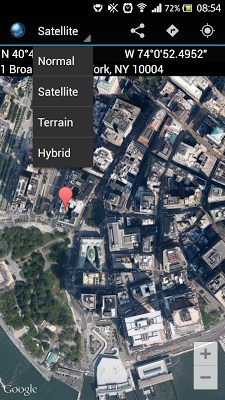
Map Coordinates will help you retrieve the coordinates and/or address of a specific location on the map. It is easy to use and very intuitive while providing 4 types of maps:- normal- satellite- terrain- hybrid and 4 types of coordinate representations:- degrees, minutes and seconds ( N 45 48 ‘ 40.47 E 22 48 ‘ 28.06 )- degrees and minutes ( N 50 11.17 ‘ E 9 53.05 ‘ )- decimal degrees ( Lat: -8.21 Long:- 61.11 )- MGRS (35TL5241798377) Map supported operations are:- 3D for normal map type- tilt using 2 fingers drag- rotation using 2 fingers rotation- drag - drop marker This app is very intuitive and easy to use, designed to help you determine the coordinates of specific point on the map and share them with your friends via email, Facebook, Twitter or Google+ accounts. If your device is rooted and you have checked the share screenshot option, a screenshot of the map will also be attached if you share your location via email. In addition, you can visualise the location on the map of certain coordinates or address. In the Settingsscreen you can switch between the available coordinates types, set the precision of MGRS coordinates type, you can show or hide the Address barand you can enable or disable the Measure toolfor which you can select different measure units, depending on your needs. The available measure units are: Metric, Imperialand Marine. There is also a Get Directions button which opens Google Maps Directions feature and displays directions from your current location (or any location that you choose there) to the location pinned in Map Coordinates. This feature is very helpful when you wish to see how much time you need to reach a point and which course you should take. Another usefull feature is Copy to clipboard. Using it, you copy the selected coordinates or address and paste them anywhere you need. More recent features are Historywhich holds all your locations history and Favoriteswhich are locations saved by you with a touch of a button so you have your favorite destinations always right at hand. This being said, I hope you enjoy this app and please feel free to contact me at ss26dev-gmail.com if you have any questions, comments or suggestions. Also please report any bugs that you might observe, and I will fix them as soon as possible. Permissions explained:- INTERNET Used by the API to download map tiles from Google Maps servers. -ACCESS_NETWOR_STATE Allows the API to check the connection status in order to determine whether data can be downloaded.
- READ_GSERVICES Allows the API to access Google web-based services.
- WRITE_EXTERNAL_STORAGE - READ_EXTERNAL_STORAGE Allows the API to cache map tile data in the device-s external storage area. -ACCESS_COARSE_LOCATION Allows the API to use WiFi or mobile cell data (or both) to determine the device-s location.
- ACCESS_FINE_LOCATION Allows the API to use the Global Positioning System (GPS) to determine the device-s location to- MAPS_RECEIVE Blocks other apps to use the Google Services API from Map Coordinates- GET_ACCOUNTS Provides access to users email address (used to block adds for certain users who help to improve Map Coordinates)
Verdict
Should you install Map Coordinates?
Map Coordinates is an Android application available under the
Freeware
license — the APK is 3.1M.
We’ve catalogued it under
Productivity.
✓
Verified clean. Every Map Coordinates APK on SoftLookup is scanned for malware, spyware, and adware. We re-test on every update.
Sponsored
At a glance
Map Coordinates specifications
- Publisher
- Developer
- Last updated
- Feb 1, 2026
- License
- Freeware
- Operating system
- Android
- File size
- 3.1M
- Price
- Free
- Page views
- 989
Sponsored
Help fellow users decide. Share your experience with Map Coordinates.