In depth
A closer look at Notebooks
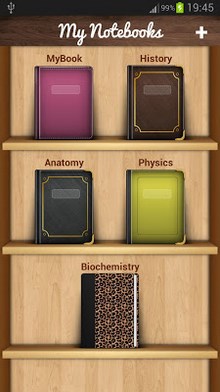
Now backup/restore to Google Drive or Dropbox- Take notes and even attach your free hand drawing, everything in style and completely without papers! Create multiple notebooks for every subject and avoid messing up your notes. Notebooks is the only application you will ever need for all your note making needs. Designed with flexibility and ease of use in mind, taking notes is now at it simplest with our application. With multiple colors and custom title for each notebook cover, you will enjoy creating a notebook for every subject you want. Notebooks is a must have application for students, business men and for anyone using their phones and tablets for taking notes. The permission GET_ACCOUNTS is to communicate with the Google Drive to backup the data. We do not store your account details in the app. Features: 1. Create multiple notebooks. 2. Customizable cover, title, number of pages and page style for every notebook. 3. Password protected. 4. Set a title for every page. 5. Instant search within each notebook. 6. Attach image files. 7. Bookmark a page. 8. Create your own free hand drawing. 9. Easily find your entries. 10. Custom fonts for each notebooks. 11. Set theme for each notebook. 12. Convert the entire Notebook to PDF with attachments. (Currently supports English only) 13. Apply text styles such as Bold, Italics and Colored-Highlights 14. Backup/Restore. (option available in the menu of the Notebooks screen) 15. Backup to Google Drive (Works on devices with OS higher than version 2.2) How to use? 1. Use ‘+- mark in the home screen to create new books. 2. Long tap on any book to edit/delete the book. 3. Use ‘Password- option in the Menu to set/reset the password. 4. On the Page tap on Page Header to set the Title for the page. 5. Tap on book shelf header to change the theme. 6. Make use of different editing options provided at the bottom of the page. How to apply font styles, such as bold, italics or color? 1. Double tap on a word in the page, to get the style controls. 2. Adjust the selection range and apply styles. 3. Tap anywhere on the page to hide the style controls.
Verdict
Should you install Notebooks?
Notebooks is an Android application available under the
Freeware
license.
We’ve catalogued it under
Productivity.
✓
Verified clean. Every Notebooks APK on SoftLookup is scanned for malware, spyware, and adware. We re-test on every update.
Sponsored
At a glance
Notebooks specifications
- Publisher
- Developer
- Last updated
- Feb 3, 2026
- License
- Freeware
- Operating system
- Android
- Price
- Free
- Page views
- 971
Sponsored
Help fellow users decide. Share your experience with Notebooks.