In depth
A closer look at Touch Calendar Free
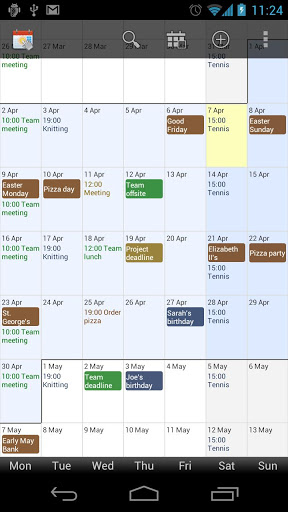
See your whole calendar at a glance. No more flipping between different calendar views. Touch Calendar does it all from one zoomable and scrollable view. Touch Calendar works with Google Calendar and any other calendars your phone supports, and the app features calendar search and custom repeating events (e.g. biweekly, bimonthly). For home screen widgets or to support the developer, please purchase the full version of Touch Calendar. Touch Calendar is easy to use:- double-tap or pinch-zoom to zoom in- tap an event to see its details, then press MENU to edit or delete it- tap-and-hold on a date to add a new event- touch to scroll as much as you want, both forwards and backwards- jump to today, or to any date from the menu- calendar search by pressing your phones search button or from the menu- set the font size and default zoom level from the Settings- home screen widgets (buy the full version) Zoom and scroll your calendar with complete freedom! Note: Text colour for events comes from the calendar colour. Set up different calendar colours in Google Calendar and they-ll appear in Touch Calendar automatically.
Verdict
Should you install Touch Calendar Free?
Touch Calendar Free is an Android application available under the
Freeware
license.
We’ve catalogued it under
Business.
✓
Verified clean. Every Touch Calendar Free APK on SoftLookup is scanned for malware, spyware, and adware. We re-test on every update.
Sponsored
At a glance
Touch Calendar Free specifications
- Publisher
- Developer
- Last updated
- Jan 19, 2026
- License
- Freeware
- Operating system
- Android
- Price
- Free
- Page views
- 1019
Sponsored
Help fellow users decide. Share your experience with Touch Calendar Free.