In depth
A closer look at Android File Manager
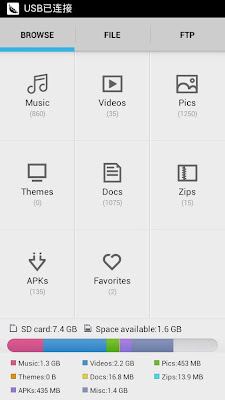
One of the most successful Android phone file manager. You can easy browse the phone-s music, video, pictures, zip files, documents and android application files and so on. You also can easily to copy, move, delete files, or upload the files to the cloud storage service . You can also browse the SD card folder directory, manage your android files through your computer after using wifi connection. you can find all these magic function in this app. ey Features: - Classify to display Music, video, pictures, documents, zip files, android app install files. Now you can easily find all the same type documents in one file list; - Easy to delete, move, copy, paste and share files; - Browse your phone SD card folder directory; - After create Wifi connection, you can use the wireless management. Through your computer to complete file operations, such as delete, copy, move, upload and so on; - Add current file folder to the favorite list - Easy to share your files through the third part app. File Manager has Integrated all types of cloud storage service, send and share your files is no longer difficulty now
Verdict
Should you install Android File Manager?
Android File Manager is an Android application available under the
Freeware
license — the APK is 564k.
We’ve catalogued it under
Productivity.
✓
Verified clean. Every Android File Manager APK on SoftLookup is scanned for malware, spyware, and adware. We re-test on every update.
Sponsored
At a glance
Android File Manager specifications
- Publisher
- Developer
- Last updated
- Feb 18, 2022
- License
- Freeware
- Operating system
- Android
- File size
- 564k
- Price
- Free
- Page views
- 1203
Sponsored
Help fellow users decide. Share your experience with Android File Manager.