In depth
A closer look at Google Text-to-Speech
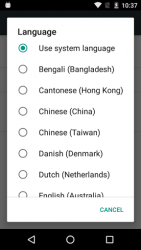
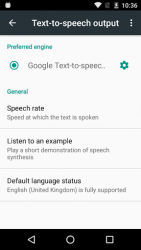
Google Text-to-speech powers applications to read the text on your screen aloud. For example, it can be used by: Google Play Books to -Read Aloud- your favourite book Google Translate to speak translations aloud so that you can hear the pronunciation of a word TalkBack and accessibility applications for spoken feedback across your device - and many other applications in Play Store To use Google Text-to-speech on your Android device, go to Settings > Language - Input > Text-to-speech output. Select Google Text-to-speech Engine as your preferred engine. Note, on many Android devices, Google Text-to-speech is already turned on, but you can update to the latest version here. Supported languages: Bangla (Bangladesh), Bangla (India), Cantonese (Hong ong), Czech, Danish, Dutch, English (Australia), English (India), English (United ingdom), English (United States), Finnish, French, German, Hindi, Hungarian, Indonesian, Italian, Japanese, hmer, orean, Mandarin (China), Mandarin (Taiwan), Nepali, Norwegian, Polish, Portuguese (Brazil), Russian, Sinhala, Spanish (Spain), Spanish (United States), Swedish, Thai, Turkish, Ukrainian and Vietnamese.
Verdict
Should you install Google Text-to-Speech?
Google Text-to-Speech is an Android application available under the
Freeware
license — the APK is 14.16 MB.
We’ve catalogued it under
Productivity.
✓
Verified clean. Every Google Text-to-Speech APK on SoftLookup is scanned for malware, spyware, and adware. We re-test on every update.
Sponsored
At a glance
Google Text-to-Speech specifications
- Publisher
- Google Inc.
- Last updated
- May 5, 2026
- License
- Freeware
- Operating system
- Android
- File size
- 14.16 MB
- Price
- Free
- Page views
- 1056
Sponsored
Help fellow users decide. Share your experience with Google Text-to-Speech.