In depth
A closer look at Applock Master
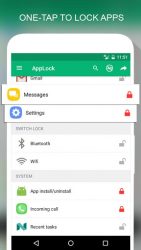
Applock Master- Feature- Lock apps with PIN, Pattern # Fingerprint (Only for Samsung devices with fingerprint sensor and Android 6.0 devices with fingerprint sensor) # Random keyboard # Time Password # Show Password transformation # Invisible Pattern # Pattern size- Lock Incoming call, Recent tasks, Switch lock ( Wi-Fi , Bluetooth), Install/Uninstall and 3rd party apps.
- Temporary unlock. You don-t need to unlock apps every time # Delay lock at time # Lock your app at the device screen off # Enter password once to unlock all- Cover (Disguise your App Lock screen to prevent from breaking into your password. Fake Fingerprint scanner and fake Force close dialog will hide the real lock screen)- Lock screen orientation (System settings, Auto-rotate, Portrait, Landscape)- Hide AppLock Master icon- Intruder selfie # Take a photo of who tried to unlock your device- Theme, background # Background (Choose from gallery, System wallpaper, Transparent, Blur) # Theme # Theme customize (Show theme icon, show app name, hint message)- Animation lock screen # Animation type (Fade, Zoom, Slide left, Slide right, Slide up, Slide down)
Verdict
Should you install Applock Master?
Applock Master is an Android application available under the
Freeware
license — the APK is 3.58 MB.
We’ve catalogued it under
Productivity.
✓
Verified clean. Every Applock Master APK on SoftLookup is scanned for malware, spyware, and adware. We re-test on every update.
Sponsored
At a glance
Applock Master specifications
- Publisher
- AMMY Entertaiment
- Last updated
- Feb 14, 2026
- License
- Freeware
- Operating system
- Android
- File size
- 3.58 MB
- Price
- Free
- Page views
- 1169
Sponsored
Help fellow users decide. Share your experience with Applock Master.