In depth
A closer look at SyncMe Wireless
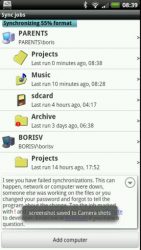
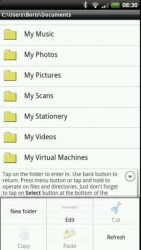
Copy, move, sync and backup your mp3, pictures and documents over WiFi, USB tethering, cellular VPN or wired network to your computer or NAS device. Nothing to be installed on your computer. Sync automatically even before you enter your home with -If connected to WiFi router-. SHARING MUST BE ENABLED ON YOUR COMPUTER, the simplest way to do this on Windows is to right click the folder you wish to synchronize select Share With and go with the instructions. Restart of the PC sometimes is needed when sharing for the very first time.For best performance when screen goes off, configure WiFi sleep policy to Never and Best WiFi Performance in your device Settings-Wireless-Networks-WiFi Settings-Advanced (you may need to hit menu button to get to the Advanced). Features: Two and one-way sync.Sync deletions.Schedule sync by combination of interval, exact time of the day, weekday, when device connects to a specific WiFi router and when power charging. Include/exclude filter for hidden, read protected, individual files/folders, file name pattern, file type (extension), file date.VPN and Portable WiFi Hot Spot over cellular connections.Wake up PC (WOL) either manually or on a scheduled sync.Organize pictures by date and/or address. Organize mp3 music by artist and/or album and rename to the original song name.Cut, copy, paste, preview remote and local files. Uses Windows shares, Samba on Linux and older Macs, CIFS (SMB) protocol. Hidden sneaky costs: There are four premium (paid) features in this app: 1) Schedule with router 2) Weekly schedule 3) Include/Exclude directories and files, new extensions and regular expressions 4) Wake up PC before sync. One time ~3$ donation covers them all and any upcoming premium feature. Previous version 1$ per feature payments can be asked to refund by email if donation is made. nown issues:1) Insufficient resources error on Windows:Check file path on Windows, paths are limited to 260 character after long files names were replaced with their short names.Also looks like Windows sometimes is not fast enough to reclaim resources. Changing registry seems to help: -HEY_LOCAL_MACHINESYSTEMCurrentControlSetservicesLanmanServerParametersSize- 3 2) Devices with Android 4.4.2 update do not have write permission for external sd card. Nothing I can do about it. code.google.com/p/android/issues/detail?id=63879 3) Paid features sometimes do not unlock. Reinstalling app/waiting for a few hours usually resolves the issue. 4) App will fail without warning or error on file/directory names having more than 127 non- ASCII and 255 ASCII characters long.code.google.com/p/android/issues/detail?id=17684 5) Some routers with NAS capability (USB plug), have no permission to update time stamps on FAT volumes. Workaround- format usb flash drive or external hard drive NTFS. 6) Windows 8.1 seems to use email address instead of normal user name on some configurations. 7) Unsupported request error or incorrect disk is full message, computer probably does not support free space request. Set disk space limit to 0 in the app-s Settings. 8) Order validation failed upon reinstallation- send me an email, will be fixed for the next version. 9) Directories ending with dot (.) are not supported neither by Samba nor by Windows. Exclude these directories using app-s Filter. This software was tested with PCs running Windows (XP, 7, 8), Linux. Works on Mac but was not officially tested.
Verdict
Should you install SyncMe Wireless?
SyncMe Wireless is an Android application available under the
Freeware
license — the APK is 1.04 MB.
We’ve catalogued it under
Productivity.
✓
Verified clean. Every SyncMe Wireless APK on SoftLookup is scanned for malware, spyware, and adware. We re-test on every update.
Sponsored
At a glance
SyncMe Wireless specifications
- Publisher
- bvaisoft
- Last updated
- Jan 29, 2026
- License
- Freeware
- Operating system
- Android
- File size
- 1.04 MB
- Price
- Free
- Page views
- 876
Sponsored
Help fellow users decide. Share your experience with SyncMe Wireless.