In depth
A closer look at Wakelock Detector-Save Battery
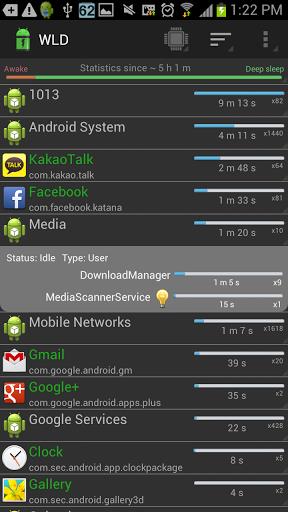
Wakelock Detector Ever wondered why your smartphone screen does not turn off automatically when it should have, the screen wakes up all of a sudden or you find your phone battery drained even when you exited apps and turned off the screen? This might be due to wakelock holding appsWakelock Detectorhelps you to detect battery consuming applications in your Android device by checking wakelock usage history. Now you can find out which applications drain your battery in a simple way by using this app!-Wakelockis a mechanism of power management service in Android OS, which can be used by other applications to keep CPU awake (Partial wakelock) and keep/turn the screen on(Full wakelock). Applications which use wakelock privilege improperly leads to situations where the CPU or phone screen stays on without user awareness and thus causing dramatic battery drain.
-Wakelock Detectorshows wakelock usage statistics for all applications, which ever held wakelock since boot. By default it displays CPU wakelocks sorting by the longest usage time. Further, you can choose Screen wakelock type to see screen related wakelocks. For instance, if your screen is keeping on even after screen timeout or your screen turns on randomly by itself, then you can choose Screen wakelock type on the top (Brightness icon) to see which wakelocks are holding your screen wakelock. Also, you can choose Wakeup triggers to see apps which are registered to Andrpod OS Alarm Manager. Furthermore, if you are interested in currently running applications then you can change sorting type to Active which shows active running applications on the top. For further details please refer to FAQ inside Settings. Main features: # shows both CPU wakelock (Partial wakelock) and Screen wakelock (Full wakelock) ; # merges wakelocks of corresponding app into one expandable view for better user experience; # currently active running applications are shown in Green color; # allows easy sorting options by Running state , Wakelock time and Alphabetical order; # shows Wakeup triggers which cause heavy usage of Alarm Manager wakelock How to use: #1 Install the app #2 Charge your phone above 90% and unplug cable (or just reboot the phone) #3 Give it a time (1-2 hours) to accumulate some wakelock usage statistics #4 Run-Wakelock Detector, it will display wakelock statistics for you! #5 Check the apps on the top, if they show very long wakelock usage time then you found the cause of your battery drain! Note: Wakelock Statistics are gathered since Step#3 Notice We are working on improving the performance of the-Wakelock Detectorby adding new features regarding wakelock issues users usually face. We are trying to follow up all your comments. And we know that the application is not ideal yet. We would appreciate if you send us email before giving negative comments in the Play Store. Your feedbacks are always welcome.
Verdict
Should you install Wakelock Detector-Save Battery?
Wakelock Detector-Save Battery is an Android application available under the
Freeware
license.
We’ve catalogued it under
Productivity.
✓
Verified clean. Every Wakelock Detector-Save Battery APK on SoftLookup is scanned for malware, spyware, and adware. We re-test on every update.
Sponsored
At a glance
Wakelock Detector-Save Battery specifications
- Publisher
- Developer
- Last updated
- Jan 28, 2026
- License
- Freeware
- Operating system
- Android
- Price
- Free
- Page views
- 1187
Sponsored
Help fellow users decide. Share your experience with Wakelock Detector-Save Battery.